



Intent: demonstrate — Walk into a modern school or organization and you’ll increasingly encounter interactive kiosks transforming how visitors navigate facilities, discover information, and connect with community achievements. These digital touchpoints represent far more than upgraded directory boards—they create personalized exploration experiences that warm up institutional spaces through relevant, engaging content visitors actually want to explore rather than ignore.
Traditional lobby information systems—static bulletin boards, printed directories, trophy cases gathering dust—fail to capture attention in an era where everyone carries smartphones expecting instant, personalized information access. Visitors spending thirty seconds scanning generic announcements quickly move on, missing opportunities to discover institutional stories, achievements, and resources that might create meaningful connections and lasting impressions.
Interactive kiosk solutions address this engagement gap by enabling visitors to explore content matching their specific interests, search for relevant information, discover recognition personally significant to them, and interact with institutional heritage in ways static displays simply cannot deliver. The result transforms cold, forgettable lobbies into warm, memorable destinations where every visitor discovers something personally relevant.
Organizations implementing thoughtful interactive kiosk strategies report dramatic shifts in visitor engagement patterns—from brief, obligatory lobby glances to extended, genuine exploration creating positive first impressions and strengthening community bonds. This guide explores how schools, universities, nonprofits, clubs, and membership organizations leverage interactive kiosks to transform visitor experiences while accomplishing important institutional goals around recognition, wayfinding, information access, and community building.

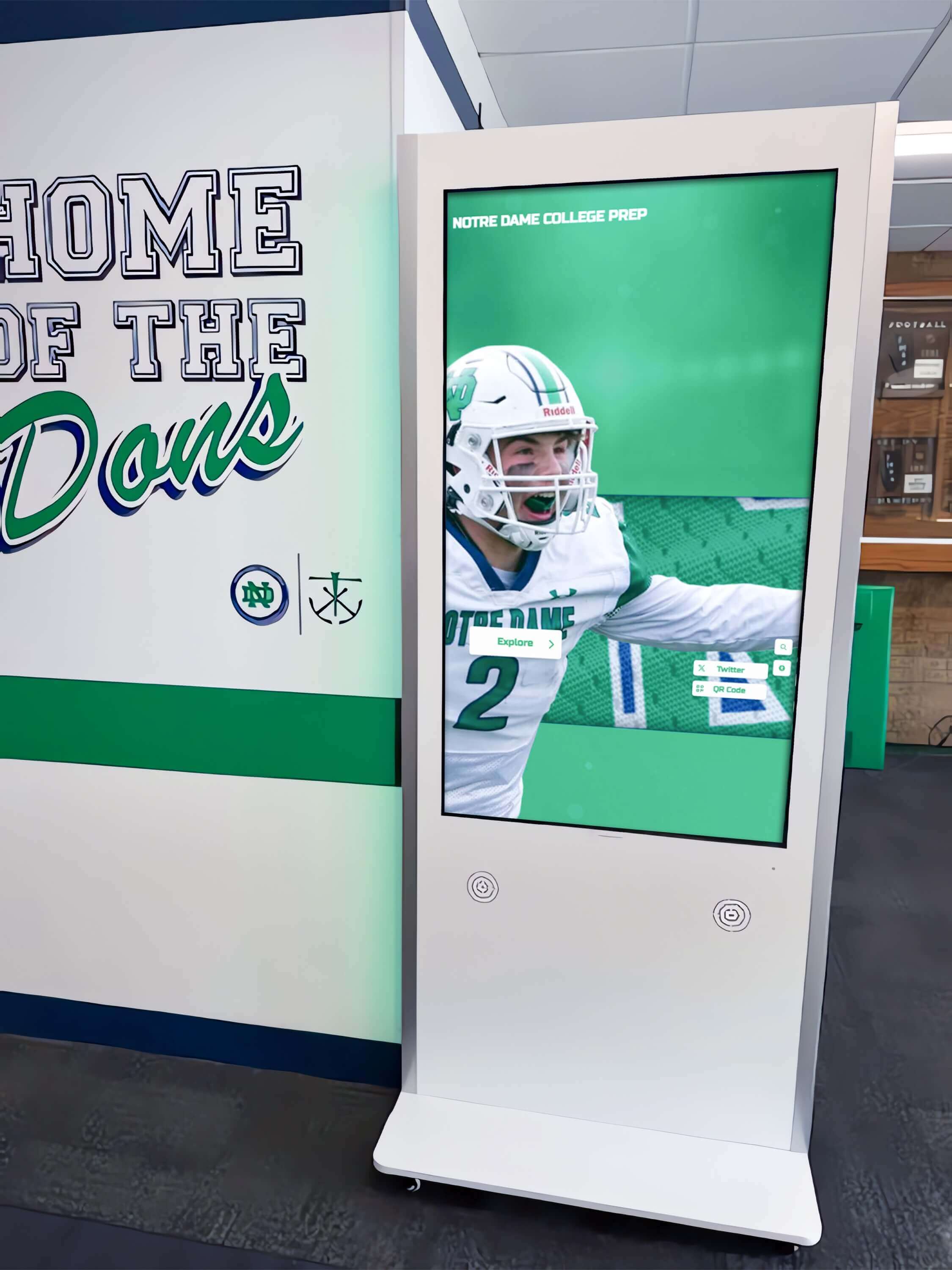
Strategic kiosk placement in high-traffic areas creates welcoming first impressions while providing immediate access to institutional information and achievements
Understanding Interactive Kiosk Solutions
Interactive kiosks represent purpose-built digital interfaces designed for public use, enabling visitors to independently access information, explore content, and accomplish tasks without staff assistance. Unlike passive digital signage broadcasting predetermined messages, interactive kiosks respond to user input, adapting content presentation based on individual interests and needs.
What Makes Kiosks “Interactive”
True interactivity extends beyond simply adding touchscreens to display systems. Effective interactive kiosks combine several essential characteristics:
Responsive Touch Interfaces Commercial-grade touchscreens designed for continuous public use respond reliably to touch inputs, supporting intuitive gestures familiar from smartphones and tablets—tapping, swiping, pinching, and scrolling. These interfaces require no training or instructions, enabling visitors of all ages and technical comfort levels to confidently explore content.
Search and Discovery Features Robust search functionality enables visitors to quickly find specific information—searching for names, locations, programs, or content types. Advanced systems accommodate partial information, alternate spellings, and natural language queries, ensuring successful searches even when visitors lack complete details.
Personalized Content Navigation Rather than forcing sequential content consumption, interactive systems enable non-linear exploration where visitors browse categories matching their interests, drill down through information hierarchies, and create personalized pathways through available content based on genuine curiosity rather than predetermined sequences.
Multimedia Content Integration Rich content combining text, photos, videos, and audio creates engaging experiences that honor the depth of stories worth telling. Interactive touchscreen displays for museums and galleries demonstrate how multimedia integration transforms passive viewing into active discovery.
Immediate Response and Feedback Systems respond instantly to inputs without frustrating delays, provide clear visual feedback confirming actions, and guide users through navigation with intuitive interface design that feels natural rather than technical.
The Digital Warming Effect of Interactive Kiosks
The concept of digital warming describes what happens when cold, impersonal institutional spaces transform into warm, welcoming environments through personalized, interactive content experiences. Interactive kiosks serve as powerful digital warming engines by creating several key engagement dynamics:
Personal Relevance Discovery When visitors search for themselves, family members, classmates, or personally significant content and successfully discover recognition or information matching their interests, they experience personal connection with the institution. This moment transforms abstract organizational identity into concrete, meaningful relationships.
Self-Directed Exploration Unlike staff-mediated information access requiring visitors to ask questions and wait for responses, interactive kiosks enable independent exploration at comfortable paces. Introverted visitors who might avoid asking for help confidently explore kiosks privately, while curious visitors dive deep into content without feeling they’re imposing on busy staff time.
Unexpected Discovery and Delight Browsing kiosks frequently surfaces unexpected discoveries—finding alumni from hometown communities, discovering surprising historical connections, or encountering inspiring achievement stories. These serendipitous moments create memorable experiences distinguishing institutions from competitors offering only functional information access.
Extended Engagement Time While static displays receive brief glances, interactive kiosks engage visitors for significantly longer periods—often three to five minutes compared to ten to twenty seconds for passive displays. This extended engagement time creates opportunities for deeper institutional connection and more comprehensive understanding of organizational identity and values.
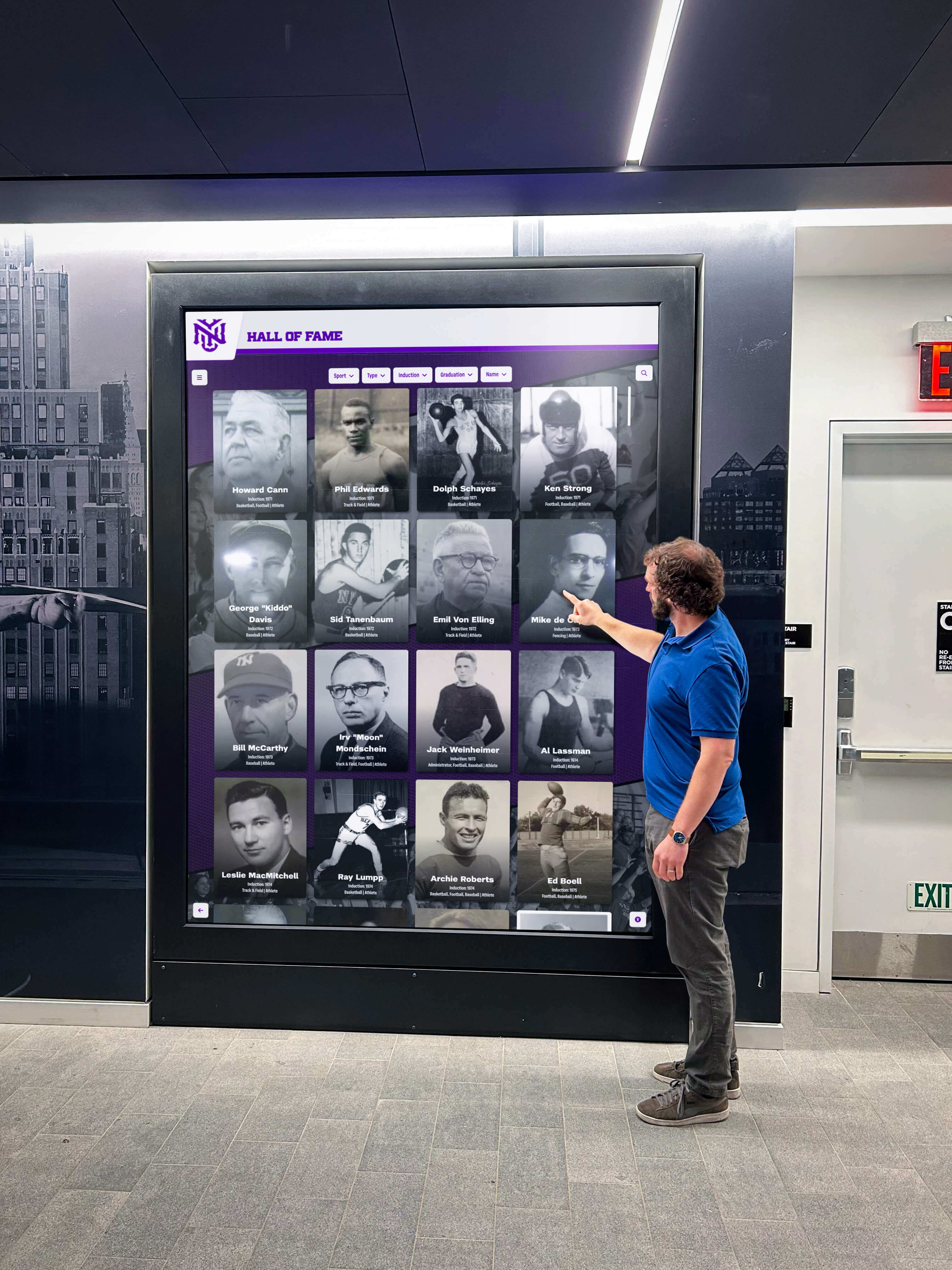
Active exploration creates memorable visitor experiences compared to passive observation of static displays
Key Applications of Interactive Kiosks
Organizations deploy interactive kiosks for diverse purposes, each addressing specific visitor needs while accomplishing institutional goals.
Wayfinding and Campus Navigation
Large campuses and multi-building facilities benefit from interactive wayfinding kiosks helping visitors navigate unfamiliar environments confidently.
Interactive Campus Maps Digital maps show current location, enable destination search, display optimal routes, and provide turn-by-turn directions. Unlike static directories requiring visitors to mentally translate two-dimensional maps into three-dimensional navigation, interactive systems provide clear, actionable guidance.
Building and Room Directories Comprehensive building directories list offices, classrooms, meeting spaces, and facilities with search functionality enabling quick location discovery without scanning lengthy alphabetical lists. Integration with scheduling systems can highlight currently available spaces or display event locations dynamically.
Event and Facility Information Campus events, facility hours, parking information, and visitor resources provide practical information enhancing visitor experiences while reducing repetitive staff inquiries about routine questions answered efficiently through self-service kiosks.
Accessibility Features Properly designed wayfinding systems include accessible routes highlighting elevators, ramps, and ADA-compliant pathways ensuring all visitors can navigate facilities independently regardless of mobility needs.
Recognition and Hall of Fame Displays
Recognition represents one of the most popular and impactful interactive kiosk applications, particularly for schools, athletic departments, and alumni organizations.
Athletic Hall of Fame Installations Digital hall of fame systems showcase inducted athletes, championship teams, influential coaches, and program contributors through searchable databases featuring comprehensive profiles with statistics, photos, videos, and biographical narratives celebrating complete achievement stories.
Interactive features enable visitors to search by name, sport, year, or achievement type while browsing featured inductees and exploring program history. Unlike physical trophy cases with finite capacity, digital systems accommodate unlimited recognition growth without space constraints.
Academic Recognition Systems Honor roll students, academic competition achievements, scholarship recipients, and distinguished academic accomplishments receive visibility comparable to athletic recognition. Honor roll digital recognition approaches celebrate intellectual achievement while motivating continued excellence through visible success examples.
Distinguished Alumni Showcases Alumni who achieve professional distinction, community leadership, creative accomplishment, or service impact worthy of recognition receive celebration through searchable databases organized by graduation year, career field, achievement category, or geographic location. Current students discover inspiring role models while alumni feel honored through permanent institutional recognition.
Employee and Staff Recognition Corporate and organizational kiosks celebrate employee achievements, service milestones, performance awards, and retirement recognition. Employee recognition ideas extend beyond traditional years-of-service plaques to comprehensive profile celebrations honoring complete careers and contributions.

Blended physical and digital recognition creates comprehensive athletic celebration while accommodating unlimited future growth
Donor Recognition and Fundraising Support
Nonprofit organizations, educational institutions, and membership organizations leveraging philanthropic support implement interactive donor recognition as meaningful stewardship while inspiring continued giving.
Comprehensive Donor Walls Digital donor recognition eliminates the space limitations forcing organizations to choose between comprehensive acknowledgment and physical capacity constraints. Donor wall ideas for nonprofits showcase all supporters across all giving levels through searchable databases, society categorization, and rich profiles honoring complete philanthropic relationships.
Campaign Progress Tracking During active fundraising campaigns, interactive kiosks function as real-time campaign hubs displaying progress toward goals, recently added donors building momentum, and impact statements connecting contributions to tangible outcomes. This transparent reporting builds trust while demonstrating campaign viability that encourages hesitant prospects to commit.
Recognition Society Directories Major gift donors, legacy society members, endowment contributors, and naming opportunity recognition receive dedicated spaces featuring enhanced profiles, family stories, gift impact narratives, and multimedia presentations celebrating transformational generosity.
Interactive Impact Visualization Beyond traditional donor lists, kiosks can showcase how contributed funds create organizational impact—students served, programs enabled, facilities built, or missions advanced through supporter generosity. This impact focus shifts emphasis from transactional acknowledgment to meaningful outcomes appreciation.
Historical Archives and Institutional Memory
Organizations with rich histories implement interactive kiosks making heritage accessible, engaging, and relevant to contemporary community members rather than trapped in archival collections.
Interactive Historical Timelines Chronological timelines visualize organizational evolution through founding stories, facility development, leadership succession, program launches, significant achievements, and cultural milestones. Interactive features enable jumping to specific periods, filtering by event categories, or exploring decade-by-decade narratives.
Digital Yearbook Archives Comprehensive photo archives preserve visual history through digitized yearbooks enabling browsing by year, searching for individuals, exploring activities across time periods, and comparing institutional evolution across decades. Digital yearbook solutions demonstrate how historical preservation creates engaging contemporary exploration rather than dusty archive storage.
Facility and Building History Organizations occupying buildings with interesting architectural histories document facility development through construction photos, architectural design information, renovation project timelines, naming histories, and donor recognition for facility funding contributions.
Oral History and Legacy Preservation Video interviews with distinguished members, long-serving staff, influential leaders, and historical figures preserve first-person accounts of institutional history and cultural evolution that would otherwise disappear as memories fade and generations pass.
Information Access and Community Resources
Beyond recognition and navigation, interactive kiosks serve as comprehensive information hubs providing visitors with valuable resources and practical assistance.
Program and Service Directories Detailed information about offered programs, available services, department contacts, staff directories, and organizational resources helps visitors understand comprehensive offerings while connecting them with appropriate resources matching their needs.
Event Calendars and Scheduling Interactive event calendars display upcoming activities, enable filtering by event type or audience, provide registration information, and help visitors plan participation in organizational programming building ongoing engagement.
Frequently Asked Questions Comprehensive FAQ databases address common visitor questions about admission requirements, membership processes, facility access, program participation, or organizational policies, reducing repetitive staff inquiries while ensuring consistent, accurate information delivery.
Community Announcements and News Current news, announcements, emergency notifications, schedule changes, and time-sensitive information reach visitors during facility visits, complementing digital communication channels while ensuring critical information reaches those physically present.

Strategically placed lobby kiosks welcome visitors while providing immediate access to recognition, wayfinding, and institutional information
Technology Considerations for Interactive Kiosk Success
Understanding technical requirements ensures kiosk investments deliver intended value while remaining sustainably manageable.
Hardware Selection and Specifications
Appropriate hardware selection balances functionality, durability, and budget considerations.
Commercial-Grade Touchscreen Displays Public-use kiosks require commercial displays designed for continuous operation rather than consumer televisions built for occasional residential use. Commercial displays feature enhanced durability, extended warranties, industrial-grade components, and specifications supporting 16-24 hour daily operation without overheating or premature failure.
Display sizes typically range from 43 to 75 inches depending on viewing distance, available space, expected simultaneous users, and content presentation requirements. Larger installations may benefit from video wall configurations combining multiple displays for expansive presentations.
Touchscreen Technology Options Capacitive touchscreens provide superior responsiveness and multi-touch gesture support familiar from smartphones, offering the most intuitive interaction experiences. Infrared touchscreen alternatives work well in high-traffic environments where screen protection proves important, though typically with slightly less responsive performance.
Mounting and Installation Approaches Wall-mounted installations provide clean aesthetics while maximizing floor space. Freestanding kiosks offer flexibility for placement optimization without architectural modification. Recessed installations integrate displays into walls for streamlined appearance protecting hardware while requiring more complex installation. Solutions like Rocket Alumni Solutions provide comprehensive hardware guidance matched to specific installation environments.
Environmental Protection Considerations Kiosks in high-traffic areas benefit from vandal-resistant glass protecting displays from impacts and intentional damage. Outdoor installations require weatherproof enclosures, temperature management, and enhanced brightness supporting visibility in direct sunlight.
Software Platform Selection
Software capabilities ultimately determine kiosk effectiveness more than hardware specifications.
Purpose-Built vs. Generic Platforms Generic digital signage software requires extensive customization creating recognition-specific features like searchable databases, individual profiles, and interactive navigation. This customization involves expensive development producing systems requiring ongoing technical maintenance and vendor dependency.
Purpose-built recognition platforms provide recognition-optimized functionality including profile templates, automated content rotation, intuitive search, achievement categorization, and management interfaces designed specifically for schools and organizations implementing recognition or information access applications.
Web-Based vs. Native Applications Web-based platforms operate through standard browsers without requiring app installation, operating system-specific development, or manual update distribution. This approach provides universal device compatibility, automatic updates, inherent accessibility advantages, and simplified technical management requiring minimal IT expertise.
Native applications potentially offer performance advantages for demanding graphics or complex interactions but require platform-specific development, manual update management, and specialized technical skills for maintenance and troubleshooting.
Cloud-Based Content Management Cloud-based content management systems enable remote updates from any internet-connected device without requiring physical presence at kiosk locations. Authorized staff add content, update information, schedule publication timing, and manage databases independently without technical expertise or vendor involvement.
This independent management capability proves critical for sustainable operation. Organizations frequently struggle when kiosk systems require vendor involvement for routine updates, creating delays, recurring costs, and administrative frustration undermining long-term program success.
Accessibility Compliance Properly designed kiosks meet WCAG accessibility standards through screen reader compatibility, keyboard navigation support, adjustable text sizes, high contrast modes, and appropriate physical mounting heights. WCAG 2.2 AA compliance considerations ensure all visitors can access kiosk content regardless of physical or cognitive abilities.
Installation and Infrastructure Requirements
Successful implementations require appropriate physical infrastructure supporting reliable kiosk operation.
Network Connectivity Requirements Digital kiosks require reliable internet connectivity for content updates and cloud platform access. Wired Ethernet connections provide superior reliability compared to WiFi, particularly in locations with challenging wireless coverage or network congestion during peak periods.
Adequate bandwidth should accommodate multimedia content streaming, real-time updates, and analytics reporting without performance degradation affecting user experiences.
Electrical and Power Considerations Dedicated electrical circuits prevent tripped breakers from kiosks sharing circuits with other high-power devices. Power-over-Ethernet solutions combine network and power delivery through single cable runs, simplifying installation in locations lacking convenient electrical outlets.
Surge protection safeguards expensive equipment from power fluctuations while uninterruptible power supplies (UPS) provide temporary operation during brief power interruptions preventing frustrating user experience disruptions.
Physical Location Optimization Strategic placement dramatically affects engagement and return on investment. High-traffic locations like main entrances, lobby areas, cafeteria spaces, or hallway intersections ensure maximum visibility and accessibility. Mounting height should position screens at comfortable eye level for standing adults while accommodating wheelchair users meeting accessibility requirements.
Ambient lighting considerations affect screen visibility—displays positioned opposite windows may experience glare during certain times, while screens in dimly lit areas might appear uncomfortably bright. Professional installation accounts for lighting conditions throughout days and seasons ensuring consistent visibility.
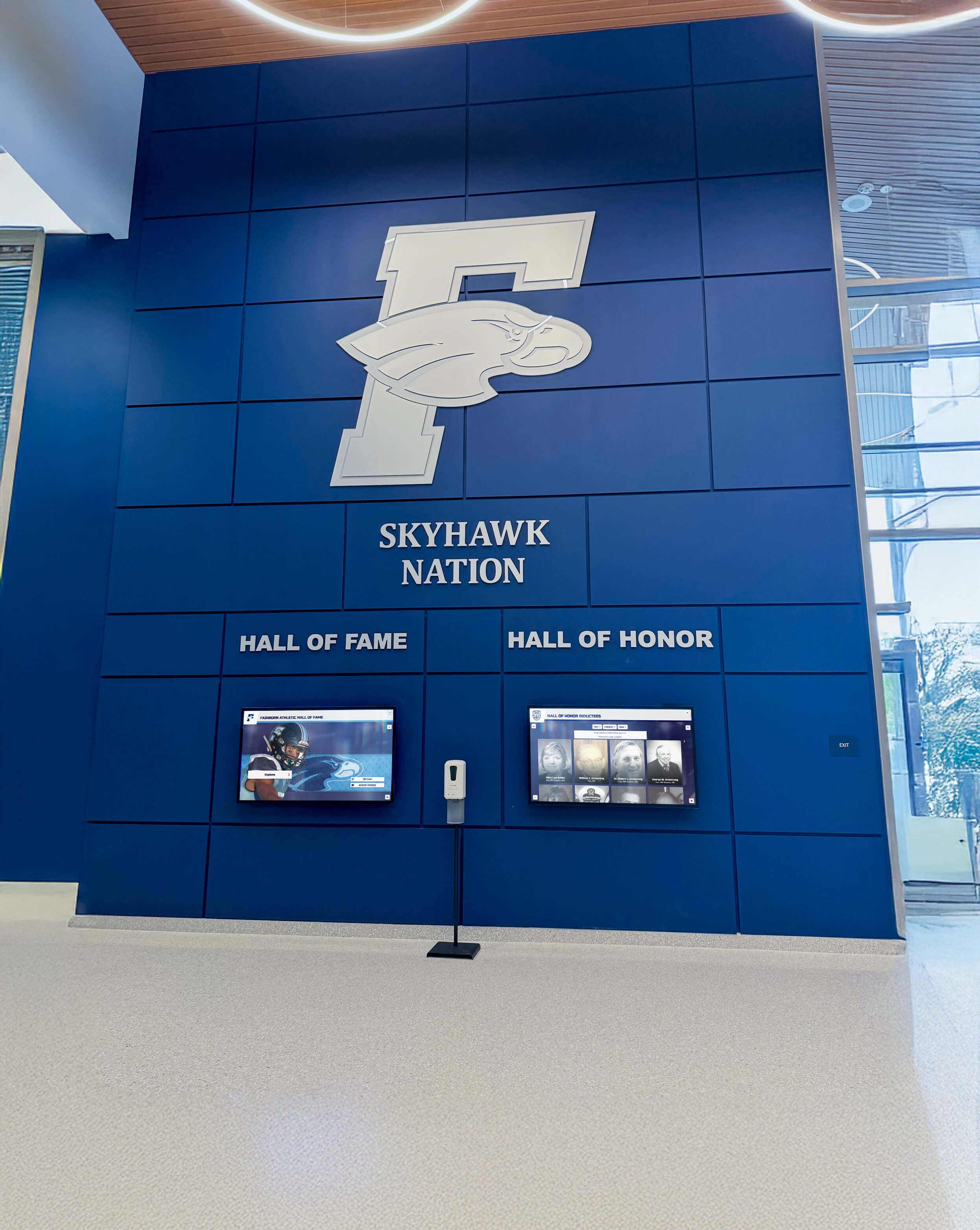
Architectural integration creates cohesive lobby designs where technology enhances rather than conflicts with existing aesthetics
Content Strategy for Engaging Interactive Kiosks
Hardware and software capabilities mean little without compelling content strategy creating genuine engagement through relevant, well-organized, regularly updated information.
Developing Comprehensive Content Libraries
Successful kiosks require substantial content volume supporting extended exploration rather than minimal information exhausted quickly.
Recognition Profile Development Recognition applications require rich individual profiles worthy of achieved accomplishments. Essential elements include full names and proper spelling, relevant dates and years, achievement categories and types, primary accomplishments and statistics, biographical narratives providing context, professional quality photos, and optional multimedia elements like videos or audio content.
Template flexibility accommodates information availability variations—comprehensive profiles for recent inductees with abundant documentation versus basic profiles for historical figures with limited surviving records.
Multimedia Asset Collection Visual and video content dramatically affects engagement impact. Professional photography provides superior results compared to amateur snapshots, particularly for formal recognition contexts. Minimum resolution requirements ensure clarity on large displays—typically 1920x1080 pixels or higher for full-screen images.
Video content creates engaging experiences when produced with good lighting, clear audio, stable footage, and appropriate length—typically 2-5 minutes for profile videos. Poor quality video detracts from recognition value rather than enhancing it, making professional production worthwhile for significant recognition applications.
Biographical Narrative Writing Written content balances comprehensive information with readable brevity. Profile narratives typically span 150-300 words providing achievement context, personal background, organizational connections, post-graduation accomplishments, and impact or legacy. First-person quotes add authenticity and personal voice when available.
Content should maintain appropriate tone—celebratory without exaggeration, informative without excessive detail, respectful without excessive formality. Reading level should accommodate diverse audiences including younger students or community members with varying education backgrounds.
Organizing Content for Intuitive Discovery
Interactive features create value only when content organization enables intuitive navigation and efficient discovery.
Logical Categorization Schemes Organize content through multiple simultaneous schemes accommodating different exploration preferences. Common organizational approaches include chronological browsing by decade or year, achievement type filtering (athletic, academic, service, leadership), program or department categories, and themed collections highlighting specific subgroups.
Multiple navigation paths ensure all visitors find intuitive entry points regardless of their mental models about content organization.
Robust Search Implementation Search represents the most direct access method when visitors seek specific information. Effective search should accept full names, partial names, last names only, graduation years, achievement categories, or activity types. Auto-complete suggestions guide users while accommodating spelling variations or incomplete information.
Search results display clearly with relevant context helping users identify correct matches among similar names, with filtering options enabling result refinement when searches return numerous matches.
Featured Content and Home Screen Design Home screens displaying featured content create engagement entry points while ensuring equitable visibility distribution. Automated rotation features different individuals or achievements on regular schedules—daily, weekly, or monthly depending on community size and content volume.
Featured content might emphasize recent inductees, anniversary recognition, seasonal relevance, or random selection ensuring long-term equity across all recognition categories. This dynamic presentation keeps kiosks fresh for frequent viewers while ensuring all recognized individuals receive featured prominence over time.
Maintaining Current, Relevant Content
Interactive kiosks require ongoing content maintenance ensuring accuracy, relevance, and continued community interest.
Scheduled Update Cycles Establish regular update schedules matching organizational rhythms—academic years for schools, fiscal years for corporations, or campaign cycles for nonprofits. Annual updates add new inductees, refresh current information, update statistics, and retire outdated time-sensitive content.
Beyond scheduled major updates, responsive content management enables prompt error corrections, supplementary information additions, and timely recognition of recent achievements maintaining kiosk currency between scheduled refresh cycles.
Content Quality Standards Maintain consistent quality standards across all content ensuring professional presentation honoring recognized individuals appropriately. Establish editorial guidelines, image specifications, biographical length parameters, and approval workflows ensuring quality control before public publication.
Regular content audits identify outdated information, broken media links, formatting inconsistencies, or factual errors requiring correction maintaining kiosk credibility and value.
Community Contribution Management Some platforms enable community members to contribute content, stories, or updates expanding information depth while building ownership and engagement. Moderation workflows ensure appropriateness and accuracy before published community contributions appear publicly, balancing open participation with institutional quality standards.

Intuitive card-based interfaces enable efficient browsing through extensive content libraries matching familiar smartphone app patterns
Implementation Best Practices for Long-Term Success
Successful interactive kiosk implementations share common characteristics reflecting systematic planning, thoughtful execution, and sustainable management.
Strategic Planning and Stakeholder Engagement
Broad stakeholder support ensures successful implementations while reducing resistance.
Leadership Support and Championship Executive leadership endorsement signals organizational priorities while ensuring resource allocation and addressing objections. Administrative champions help navigate institutional processes, coordinate across departments, and maintain momentum through implementation challenges.
User Group Input During Planning Engage representatives from key stakeholder groups during planning gathering input about content priorities, feature preferences, and usability requirements. Students or young members provide technology adoption insights. Community members share perspectives about meaningful engagement. Administrative staff identify operational considerations affecting daily management.
Participatory approaches build ownership while ensuring implementations serve actual user needs rather than reflecting only administrator assumptions about ideal functionality.
Budget Planning and Resource Allocation Comprehensive budgets address hardware costs, software licensing, installation expenses, content development, staff training, and ongoing maintenance. Phased approaches beginning with pilot installations demonstrate value before requesting full-scale funding, reducing financial risk while building confidence through proven success.
Professional Installation and Launch
Technical deployment quality affects long-term satisfaction and community confidence.
Qualified Contractor Selection Partner with qualified audio-visual contractors for physical installation ensuring secure mounting, proper cable management, appropriate viewing angles, code compliance, and professional finish quality. Experienced contractors prevent amateur mistakes requiring expensive correction while ensuring warranty validity.
Comprehensive Pre-Launch Testing Test all functionality systematically before public announcement: search features with various query types, content browsing through all navigation paths, multimedia playback across formats, mobile device compatibility, accessibility features using screen readers and keyboard navigation, and content management workflows.
Identify and resolve usability issues during testing rather than discovering problems through frustrated community members attempting to use launched systems.
Soft Launch and Iterative Refinement Consider soft launch periods making kiosks available without major publicity, enabling observation of actual usage patterns while gathering early feedback. Address discovered issues before high-profile official launch announcements creating expectations about polish and completeness.
This iterative approach acknowledges that real-world usage reveals considerations impossible to anticipate during development, enabling refinement creating superior final products.
Ongoing Management and Evolution
Long-term success requires sustained attention beyond initial installation celebrations.
Staff Training and Capability Building Comprehensive training ensures multiple staff members can confidently manage kiosk content, troubleshoot common issues, and maintain quality standards. Training should address content management platform navigation, profile creation workflows, media formatting requirements, publishing schedules, and basic troubleshooting procedures.
Cross-training multiple staff members prevents single points of failure where kiosk management depends entirely on one individual whose departure or unavailability cripples content maintenance.
Regular Content Refresh Schedules Establish and maintain consistent schedules for content additions, updates, and refresh cycles. Regular activity signals ongoing institutional commitment while keeping kiosks relevant and engaging for repeat visitors. Stale content undermines kiosk value, causing visitors to stop checking for updates once they conclude content never changes.
Analytics Review and Optimization Monitor usage analytics revealing interaction volumes, session durations, popular content, search patterns, and navigation flows. These insights inform content development priorities, navigation refinement, and feature enhancement creating increasingly effective kiosks through data-informed improvement.
Regular analytics review demonstrates ongoing value to leadership while identifying optimization opportunities maximizing return on kiosk investments.
Measuring Interactive Kiosk Impact
Investment justification and continuous improvement require systematic assessment measuring actual usage, engagement depth, and organizational value.
Usage and Engagement Metrics
Digital platforms provide quantitative data revealing actual community engagement.
Interaction Volume and Frequency Total interaction counts measure overall engagement volume indicating how frequently visitors use kiosks. Unique visitor estimates derived from session patterns reveal reach beyond repeat users. Time-of-day patterns show peak usage periods informing content scheduling and facility staffing decisions.
Comparing usage across multiple kiosk locations helps identify optimal placement while revealing underperforming installations that might benefit from relocation or enhanced promotion.
Session Duration and Content Depth Average session duration indicates engagement depth—brief visits suggest superficial interaction while extended sessions demonstrate genuine interest and meaningful exploration. Content depth metrics tracking page views per session, search usage frequency, video completion rates, or specific content category popularity reveal what content types drive engagement.
Organizations implementing interactive kiosks typically observe average engagement times of 3-5 minutes compared to 10-20 seconds for static signage, demonstrating dramatic differences genuine interactivity creates through content depth and personalized exploration options.
Search Term Analysis Search query logs reveal what visitors seek, highlighting popular individuals or topics while identifying gaps where sought content doesn’t exist. Unsuccessful searches showing zero results represent improvement opportunities—developing content addressing these interests or enhancing search algorithms capturing variations not currently recognized.
Popular search terms might inform featured content selections, ensuring frequently sought individuals or topics receive appropriate visibility through prominent placement beyond search-dependent discovery.
Stakeholder Feedback and Satisfaction
Qualitative feedback provides context beyond quantitative metrics.
Visitor Observation and Comments Observe how visitors interact with kiosks, noting engagement duration, group interaction patterns, navigation difficulties, and spontaneous comments revealing reception. Staff positioned near kiosks can informally gather feedback while assisting visitors encountering difficulties.
Positive organic comments and enthusiastic exploration indicate successful implementations creating genuine value. Frustrated abandonment or confused navigation suggest usability improvements needed before visitors develop negative associations undermining future engagement.
Recognized Member Reactions Gather feedback from recognized individuals and their families about recognition experiences. Positive reception indicates meaningful recognition honoring accomplishments appropriately. Concerns about accuracy, incomplete information, or presentation quality identify improvement opportunities ensuring recognition maintains intended value.
Administrative Assessment Survey staff about content management ease, administrative efficiency gains, and perceived value compared to traditional approaches. Positive staff experiences indicate sustainable systems likely to receive ongoing attention, while frustrating management tools predict eventual abandonment regardless of visitor reception.
Return on Investment Evaluation
Comprehensive value assessment considers multiple benefit dimensions beyond direct financial returns.
Cost Comparison to Traditional Approaches Calculate cumulative costs of traditional recognition, information systems, or visitor services over comparable timeframes. Traditional plaques require $50-200 per inductee for engraving and installation, creating recurring costs accumulating over years. Digital systems have zero marginal costs per additional inductee after initial investment.
Advancement and Development Impact Monitor whether kiosk implementations correlate with improved donor retention, increased giving frequency, enhanced alumni engagement, or stronger volunteer recruitment. While attribution proves challenging, advancement teams often observe positive trends following comprehensive recognition implementations demonstrating tangible value supporting institutional priorities.
Recruitment and Enrollment Effects Track whether improved visitor experiences contribute to recruitment outcomes, increased prospective family engagement, or enhanced institutional reputation. Positive first impressions created through engaging kiosks can influence enrollment decisions in competitive environments where multiple acceptable options exist.
Cultural and Intangible Benefits Consider harder-to-quantify benefits including community pride, cultural cohesion, tradition preservation, and strengthened institutional identity. These intangible outcomes justify kiosk investments beyond purely financial calculations by contributing to organizational health and community vitality.
Cost Considerations and Budget Planning
Interactive kiosk implementations range from modest investments to comprehensive installations requiring substantial capital.
Initial Investment Components
Understanding complete initial requirements prevents budget surprises.
Hardware Costs Commercial-grade touchscreen displays range from $2,000-8,000 depending on size, features, and durability specifications. Mounting hardware, cabling, electrical work, and professional labor add $500-2,000 per display depending on location complexity and infrastructure requirements.
Multiple display installations benefit from volume discounts and shared infrastructure reducing per-display costs. Simple wall mounts prove less expensive than recessed installations requiring architectural modification.
Software Platform Fees Platform costs vary dramatically between generic digital signage subscriptions ($50-200 monthly) requiring extensive customization and purpose-built recognition systems ($200-500 monthly) providing comprehensive functionality without additional development costs.
One-time setup fees for content migration, initial configuration, and staff training typically range from $1,000-5,000 depending on data volume, customization requirements, and training scope.
Content Development Expenses Initial content development represents significant investment often underestimated during planning. Professional photography costs $150-300 per subject for quality portrait sessions. Video production ranges from $500-2,000 per profile depending on length and production quality.
Organizations can reduce content costs through phased approaches prioritizing recent recognition with readily available materials while gradually expanding historical content over multiple years as resources permit.
Ongoing Operating Costs
Sustainable operations require recurring funding.
Platform Subscriptions and Licenses Cloud-based platforms typically charge monthly or annual subscription fees covering software licensing, hosting, automatic updates, and technical support. These recurring costs remain relatively stable unlike purchased software requiring major version upgrades every few years.
Content Maintenance and Updates Annual recognition updates or regular information refreshes require ongoing content development including photography, writing, research, and profile creation. Dedicated staff time or contracted services budget $2,000-10,000 annually depending on recognition program scope and content quality expectations.
Technical Support and Maintenance Hardware eventually requires service—screen repairs, computer replacements, or component upgrades. Extended warranties or service agreements provide predictable costs while ensuring prompt repair responses. Budget approximately 10-15% of initial hardware costs annually for maintenance reserves ensuring coverage for eventual repairs or replacements.
Cost-Effective Implementation Strategies
Budget-conscious organizations can implement kiosks strategically maximizing value while managing expenses.
Phased Deployment Approaches Begin with single strategic kiosk in highest-traffic location rather than attempting comprehensive facility coverage immediately. Demonstrate value and build stakeholder support before requesting funding for expansion installations.
Hybrid Physical-Digital Recognition Maintain existing traditional recognition elements while adding complementary digital kiosks providing exploration depth and interactive engagement traditional elements cannot deliver. This hybrid approach reduces overall costs while satisfying stakeholders preferring traditional permanent recognition.
Leveraging Existing Infrastructure Install kiosks in locations with existing network connections and electrical service rather than running new infrastructure. Utilize existing display mounting points or architectural features rather than requiring custom construction.
Future Trends in Interactive Kiosk Technology
Interactive kiosk capabilities continue evolving with emerging technologies and changing visitor expectations.
Mobile Integration and Personal Device Connectivity
Increasingly, kiosks integrate with personal mobile devices extending engagement beyond physical installations.
QR Code Content Access QR codes enable visitors to instantly access kiosk content on personal smartphones, continuing exploration after leaving facilities while sharing discoveries with extended networks. Mobile access extends engagement time and geographic reach beyond physical kiosk locations.
Personal Account Synchronization Visitors create accounts enabling personalized content recommendations, saved searches, favorite collections, and continued exploration across physical kiosks and web platforms. Personal accounts enable long-term relationship building rather than anonymous one-time interactions.
Social Sharing Integration One-tap social sharing enables visitors to broadcast discoveries to personal networks, extending institutional reach while demonstrating community pride. User-generated content sharing serves as authentic marketing impossible to create through traditional paid advertising.
Enhanced Personalization and Artificial Intelligence
Advanced platforms increasingly leverage personalization and AI creating more relevant, engaging experiences.
Behavioral Learning and Recommendations Systems learn from interaction patterns, suggesting relevant content based on previous explorations. Visitors who explore athletic recognition might receive recommendations for related sports or similar achievement types. Those browsing specific historical periods might discover related content from the same era.
Natural Language Search Conversational search interfaces accept questions in natural language rather than requiring structured queries. Visitors might ask “Who were the basketball players from 2010?” rather than constructing formal database queries using specific field names and operators.
Predictive Content Surfacing AI analyzes engagement patterns predicting what content will resonate with specific visitor segments, optimizing featured content presentation for maximum interaction and satisfaction.
Accessibility Advances and Universal Design
Continued accessibility improvements ensure kiosks serve all visitors regardless of physical or cognitive abilities.
Voice Control Interfaces Voice commands enable hands-free navigation supporting visitors with limited mobility or those preferring audio interaction. Natural language voice control makes technology more accessible while reducing barriers for less tech-savvy visitors.
Enhanced Screen Reader Support Continued web accessibility improvements ensure compatible screen reader experiences enabling blind or visually impaired visitors to access complete kiosk content through assistive technologies.
Cognitive Accessibility Features Simplified navigation modes, adjustable complexity levels, and clear visual hierarchies accommodate visitors with cognitive disabilities ensuring kiosk content remains accessible to entire communities regardless of ability variations.
Conclusion: Transforming Visitor Experiences Through Interactive Engagement
Interactive kiosk solutions represent transformative technology for schools, universities, nonprofits, clubs, and membership organizations when implemented thoughtfully with clear purpose, appropriate technology selection, compelling content, and sustainable management approaches. These systems extend far beyond upgraded bulletin boards or digital directory replacements, instead creating genuine engagement infrastructure that celebrates achievements, provides valuable information access, facilitates navigation, and creates the kind of warm, welcoming environments where visitors discover personal relevance and organizations demonstrate authentic values.
Traditional approaches to lobby technology and visitor information—static directories, bulletin boards, printed guides—face fundamental limitations undermining effectiveness. Physical space constraints force difficult prioritization decisions. Static formats offer no capacity for personalized exploration or content depth. Most critically, conventional approaches fail to create engaging experiences that transform brief, forgettable lobby visits into memorable interactions creating lasting positive impressions and strengthened institutional connections.
The concept of digital warming describes what happens when cold, impersonal institutional spaces transform into vibrant, welcoming destinations through personalized, interactive content experiences. When visitors discover personally relevant recognition, successfully navigate facilities independently, and explore institutional heritage matching their interests—these interactions create warmth strengthening bonds and motivating ongoing engagement extending beyond brief physical visits.
Implementation success requires systematic planning addressing organizational objectives establishing what visitor needs deserve addressing, content development creating rich information worthy of exploration, technology selection balancing functionality with sustainable management, strategic placement maximizing visibility and accessibility, and operational excellence ensuring sustained quality over time. Organizations following thoughtful approaches create kiosks delivering value for decades while adapting to evolving technologies and community expectations.
Purpose-built platforms like Rocket Alumni Solutions deliver capabilities specifically optimized for recognition, information access, and community engagement while eliminating complexity inherent in custom development or adapting generic digital signage systems. Unlimited capacity accommodating comprehensive content without space constraints, intuitive content management enabling prompt updates without technical expertise, comprehensive accessibility ensuring universal engagement, responsive web platforms extending content globally, and professional implementation support enable organizations to focus on community service rather than technical challenges.
Every visitor entering your facilities represents opportunity to create positive impressions, build community connections, and demonstrate institutional values through welcoming, engaging experiences. Your lobbies and common areas can accomplish far more than utilitarian wayfinding—these prime spaces can showcase achievements, provide valuable information access, preserve irreplaceable heritage, and create the kind of meaningful experiences that transform casual visitors into committed community members.
Ready to explore how interactive kiosk solutions can transform your visitor experiences while building vibrant, engaged communities? Discover how Rocket Alumni Solutions creates interactive kiosk experiences that welcome visitors, celebrate achievements, and deliver the digital warming essential for thriving organizations committed to meaningful engagement where every visitor discovers personal relevance and connection.































