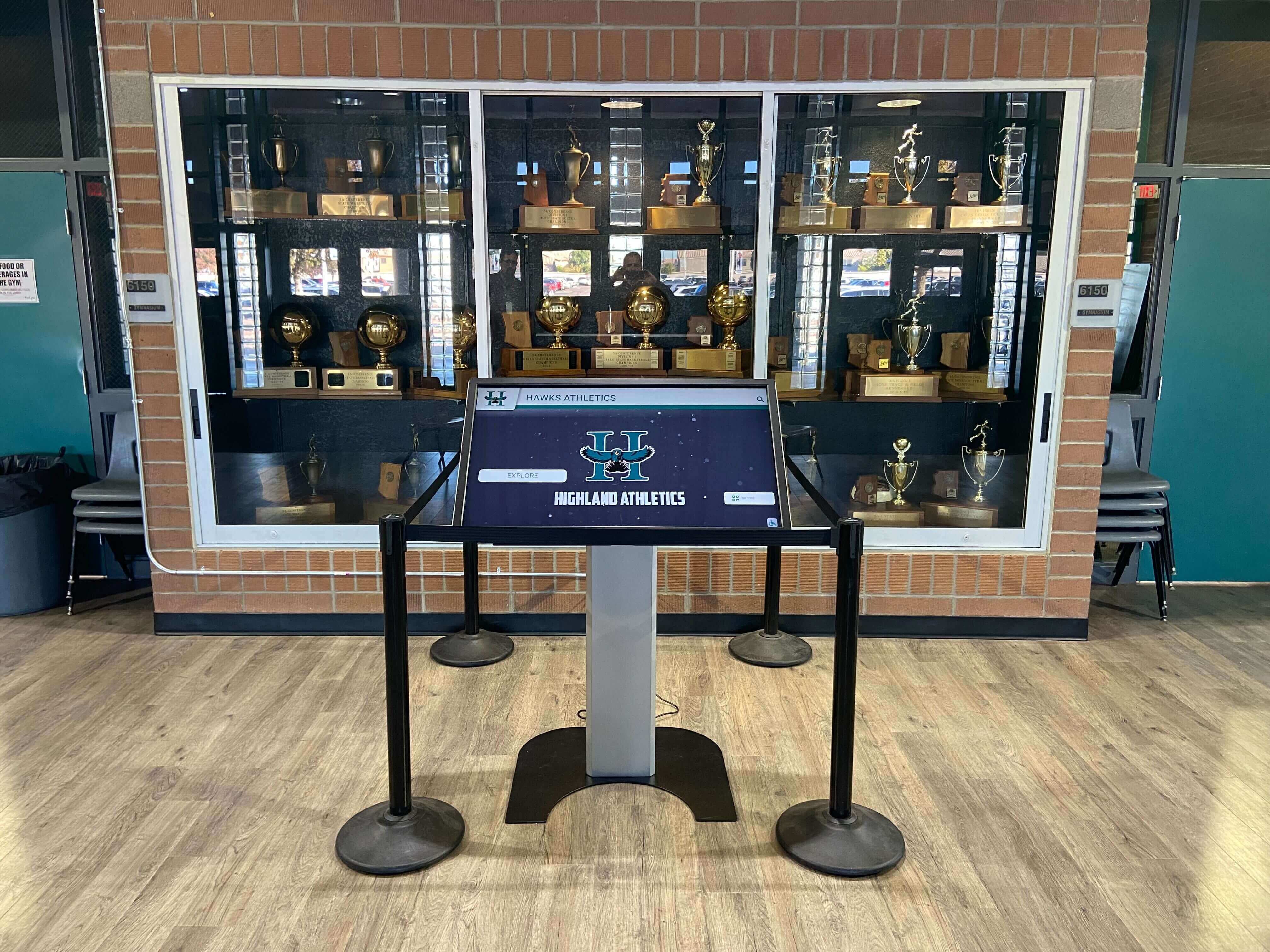
School lobbies serve as crucial first impression spaces where visitors, students, and community members form initial perceptions of your institution. Yet many school entrances remain underutilized—static bulletin boards displaying outdated information, locked trophy cases gathering dust, and disengaged visitors waiting without meaningful interaction opportunities. Interactive digital signage kiosks transform these passive spaces into dynamic community engagement hubs that inform, inspire, and connect stakeholders with your school’s mission and achievements.
Traditional lobby signage approaches create multiple operational challenges. Printed materials require constant updates and redistribution. Static displays become invisible to regular visitors who walk past unchanged content daily. Emergency communications struggle to reach everyone simultaneously. Recognition programs honor past achievements without engaging current students. Directory information becomes outdated as staff changes occur. These limitations make school lobbies feel disconnected from the vibrant educational communities they represent.
This comprehensive guide examines interactive digital signage kiosk technology specifically for school lobby applications—covering essential features, proven use cases, technical specifications, implementation considerations, and buying criteria to help administrators make informed technology investments that enhance community engagement while streamlining operations.
Interactive digital signage kiosks represent sophisticated touchscreen systems combining hardware displays, interactive software platforms, content management capabilities, and connectivity infrastructure. Unlike passive digital displays that broadcast one-way information, interactive kiosks invite user engagement through touch interfaces enabling visitors to explore content, search directories, check schedules, view achievements, and access resources relevant to their specific needs.

Modern interactive kiosks integrate seamlessly with existing school displays while providing engaging touchscreen experiences for visitors and students
Understanding Interactive Digital Signage Kiosk Technology
Interactive kiosk systems differ fundamentally from standard digital displays through their capacity for two-way communication and personalized content delivery based on user interaction.
Core Technology Components
Effective interactive digital signage kiosks integrate multiple technology layers working cohesively to deliver seamless user experiences.
Display Hardware and Touch Technology Commercial-grade touchscreen displays form the foundation of interactive kiosk systems. Professional installations typically utilize capacitive touch technology offering responsive multi-touch capabilities similar to smartphones and tablets. Screen sizes for lobby applications generally range from 43 inches to 75 inches depending on viewing distances and available space, with 55-inch displays representing the most common lobby installation size balancing visibility with space efficiency.
Display resolution matters significantly for touch interaction accuracy and content clarity. Minimum 1080p resolution (1920x1080 pixels) ensures readable text and clear images, while 4K displays (3840x2160 pixels) deliver exceptional clarity particularly valuable when displaying detailed graphics, small text, or high-resolution photography. Brightness specifications matter less for indoor lobby installations than outdoor applications, though minimum 400 nits brightness ensures visibility in well-lit entrance areas with significant natural light.
Content Management Systems Interactive kiosks require specialized content management systems (CMS) enabling administrators to control displayed information, update content, schedule programming, and manage user interaction pathways. Cloud-based CMS platforms allow remote content updates from any internet-connected device, eliminating the need for physical access to kiosk hardware when changing displayed information.
Effective CMS platforms for schools provide intuitive interfaces allowing non-technical staff to update content without extensive training. Drag-and-drop editors, template libraries, scheduling capabilities, and preview functions enable administrators to manage content efficiently while maintaining professional appearance. Integration capabilities allowing the CMS to pull information from existing school databases, student information systems, calendars, and other data sources prevent duplicate data entry while ensuring information accuracy.
Interactive Software Capabilities
The software layer determines what users can do with interactive kiosks and how information gets presented through touch interfaces.
Navigation and User Interface Design Touch-optimized interface design differs significantly from traditional web design or print layouts. Interactive kiosk interfaces require larger touch targets (minimum 44x44 pixels), clear visual hierarchy, simplified navigation paths, and forgiving interaction patterns accommodating users with varying technology comfort levels. The most effective school kiosk interfaces use card-based layouts, icon navigation, and clear category organization enabling visitors to find desired information within 2-3 taps.
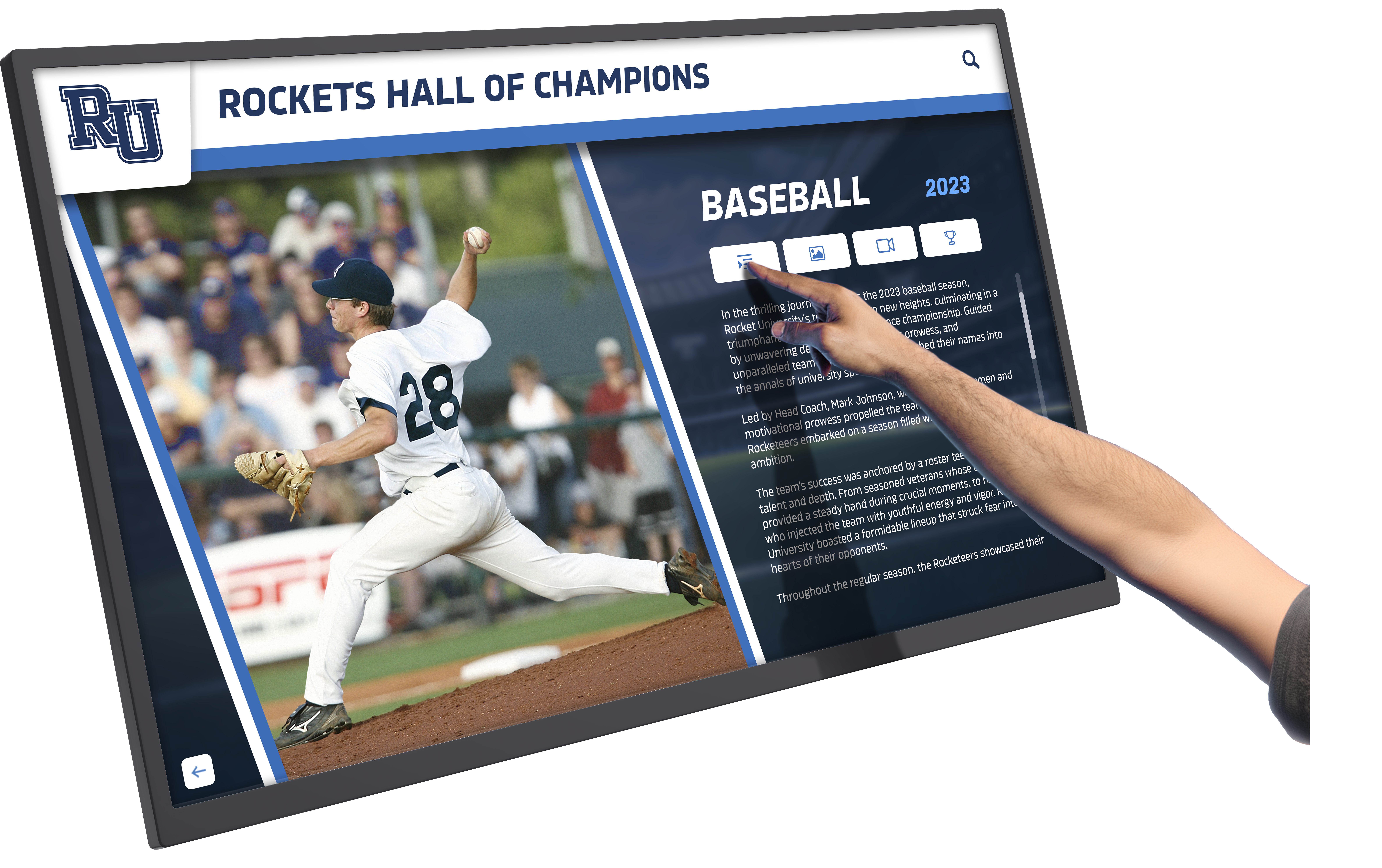
Responsive touch interfaces enable visitors to explore content at their own pace and access information relevant to their specific interests
Search and Directory Functionality Interactive kiosks excel at providing searchable directories helping visitors quickly locate specific people, departments, rooms, or resources. Effective directory implementations include alphabetical browsing, category filtering, search-as-you-type functionality, and phonetic search understanding common spelling variations. Directory integration with existing staff databases ensures automatic updates as personnel changes occur.
Wayfinding functionality extends directory capabilities by providing directions to located resources. While full navigation apps require additional infrastructure, basic location information (“Main Office - Second Floor, Room 201”) helps visitors navigate unfamiliar buildings efficiently.
Proven Use Cases for School Lobby Kiosks
Interactive digital signage kiosks serve multiple simultaneous functions transforming school lobbies into multifunctional community spaces rather than simple transition areas.
Visitor Management and Wayfinding
Schools increasingly prioritize security while maintaining welcoming environments for legitimate visitors. Interactive kiosks support both objectives through integrated visitor management capabilities.
Self-Service Check-In Systems Advanced interactive kiosk implementations include visitor check-in functionality allowing visitors to sign in, state their purpose, receive temporary badges, and notify intended contacts of their arrival. Integration with visitor management software enables automated background checks, pre-registration for expected visitors, and digital visit logs replacing paper sign-in sheets.
Self-service check-in reduces reception desk workload during peak arrival times while ensuring consistent security protocols get followed for every visitor. Badge printing capabilities combined with camera integration enable photo visitor badges enhancing security through visual identification. For schools seeking comprehensive information about visitor kiosk implementations, established best practices from hospitality and corporate environments translate effectively to educational settings.
Building Directories and Navigation School campuses, particularly large secondary schools and college preparatory institutions, can feel overwhelming to first-time visitors. Interactive directories provide searchable staff listings, department locations, room numbers, and facility information helping visitors navigate independently.
Effective directory implementations include administrative offices, counseling services, special programs, athletic facilities, performing arts venues, and frequently visited locations. Visual floor plans with highlighted locations provide better orientation than text directions alone, particularly valuable for visitors with limited English proficiency who can understand visual maps despite language barriers.
Dynamic Community Engagement and Recognition
Interactive kiosks transform static recognition displays into engaging experiences that capture attention and inspire current students through accessible achievement showcases.
Athletic Hall of Fame and Achievement Displays Traditional athletic recognition approaches—engraved plaques and locked trophy cases—honor past achievements while remaining disconnected from current student experiences. Interactive digital displays bring recognition to life through photo galleries, video highlights, statistics, biographical information, and searchable databases enabling students to explore athletic heritage meaningfully.
Touch screen kiosk software designed specifically for recognition applications enables rich multimedia presentations impossible with static displays. Students can search for specific athletes, browse by sport or year, view championship teams, watch highlight videos, and share discoveries with friends and family.
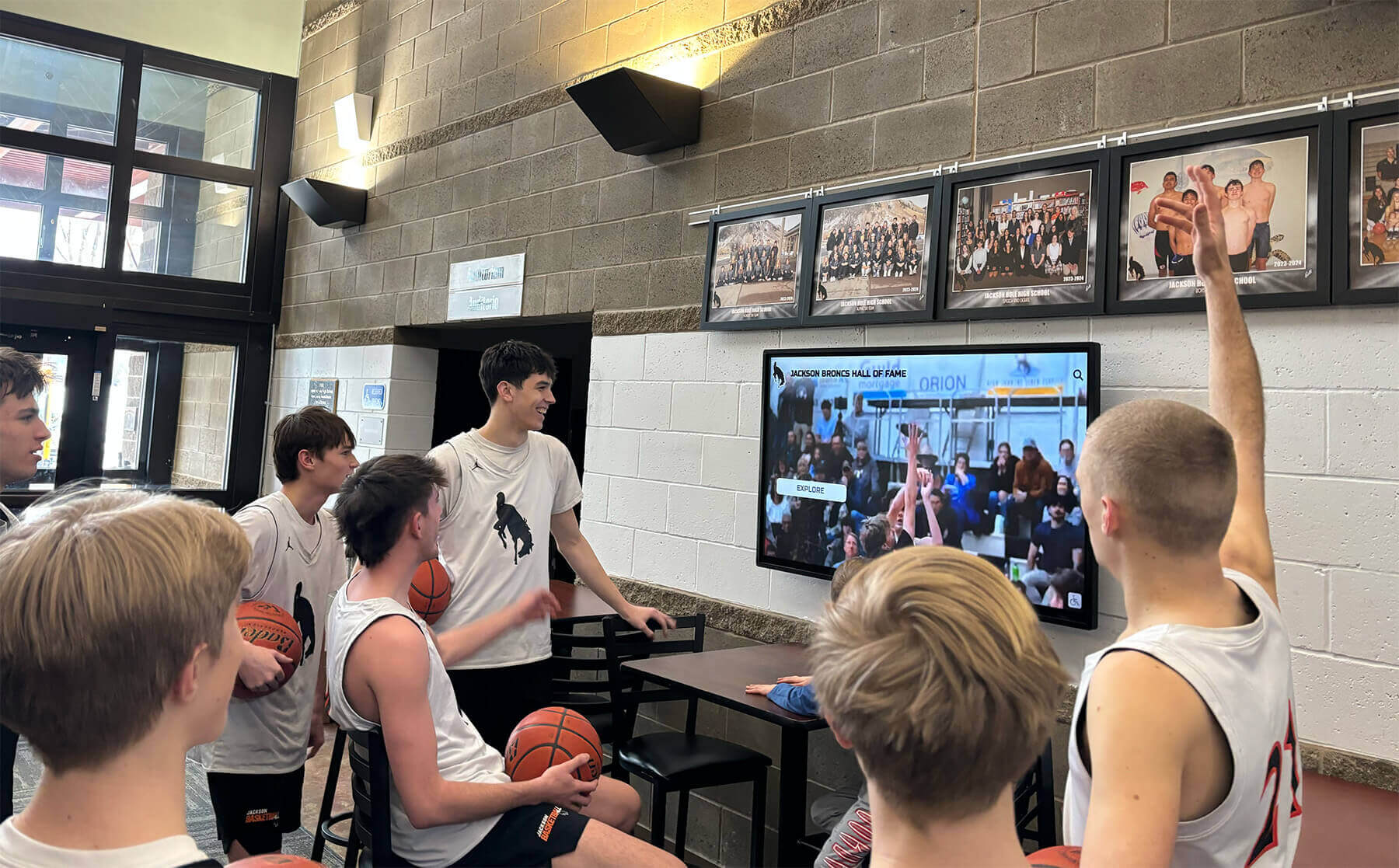
Interactive displays engage current students with athletic program history while celebrating achievements in formats resonating with digital-native generations
Recognition displays extend beyond athletics to honor academic achievements, arts accomplishments, community service contributions, and leadership examples. Interactive formats make recognition accessible and engaging rather than static and forgettable. Schools implementing comprehensive recognition programs often benefit from understanding how digital donor recognition walls create lasting impressions on benefactors and community members.
Academic and Extracurricular Showcases Beyond athletic recognition, interactive kiosks showcase diverse school accomplishments including academic awards, arts performances, student projects, club activities, and community service initiatives. Digital showcases provide visibility for achievements that traditional bulletin boards cannot accommodate, ensuring all students see their contributions celebrated regardless of activity type.
Science fair projects, art portfolios, theater performances, musical concerts, debate tournament results, robotics competitions, and volunteer initiatives all deserve recognition. Interactive displays accommodate unlimited content rotating through featured achievements while providing searchable archives ensuring long-term accessibility. This comprehensive approach to recognition strengthens school culture by communicating that excellence takes many forms and every contribution matters.
Real-Time Information and Emergency Communications
School communities need current information about schedules, events, announcements, and emergency situations delivered through reliable channels reaching stakeholders when time-sensitive information matters most.
Live Schedule and Event Information Interactive kiosks eliminate outdated paper schedules by displaying real-time information pulled automatically from school calendar systems. Students, parents, and visitors can check daily schedules, upcoming events, facility reservations, athletic contests, performing arts shows, parent meetings, and community programs through searchable, filterable displays always reflecting current information.
Calendar integration ensures automatic updates as events get scheduled, rescheduled, or cancelled, preventing the outdated information problems plaguing printed materials and static displays. Category filtering enables users to view relevant information—a parent checking upcoming parent-teacher conferences sees different results than a student checking athletic schedules, despite both accessing the same kiosk system.
Emergency Alert and Communication Systems Interactive kiosks integrate with emergency notification systems to broadcast critical information during safety situations. Emergency override capabilities allow administrators to instantly replace normal programming with urgent messages, lockdown procedures, evacuation instructions, or all-clear notifications ensuring everyone in the building receives consistent, accurate information simultaneously.
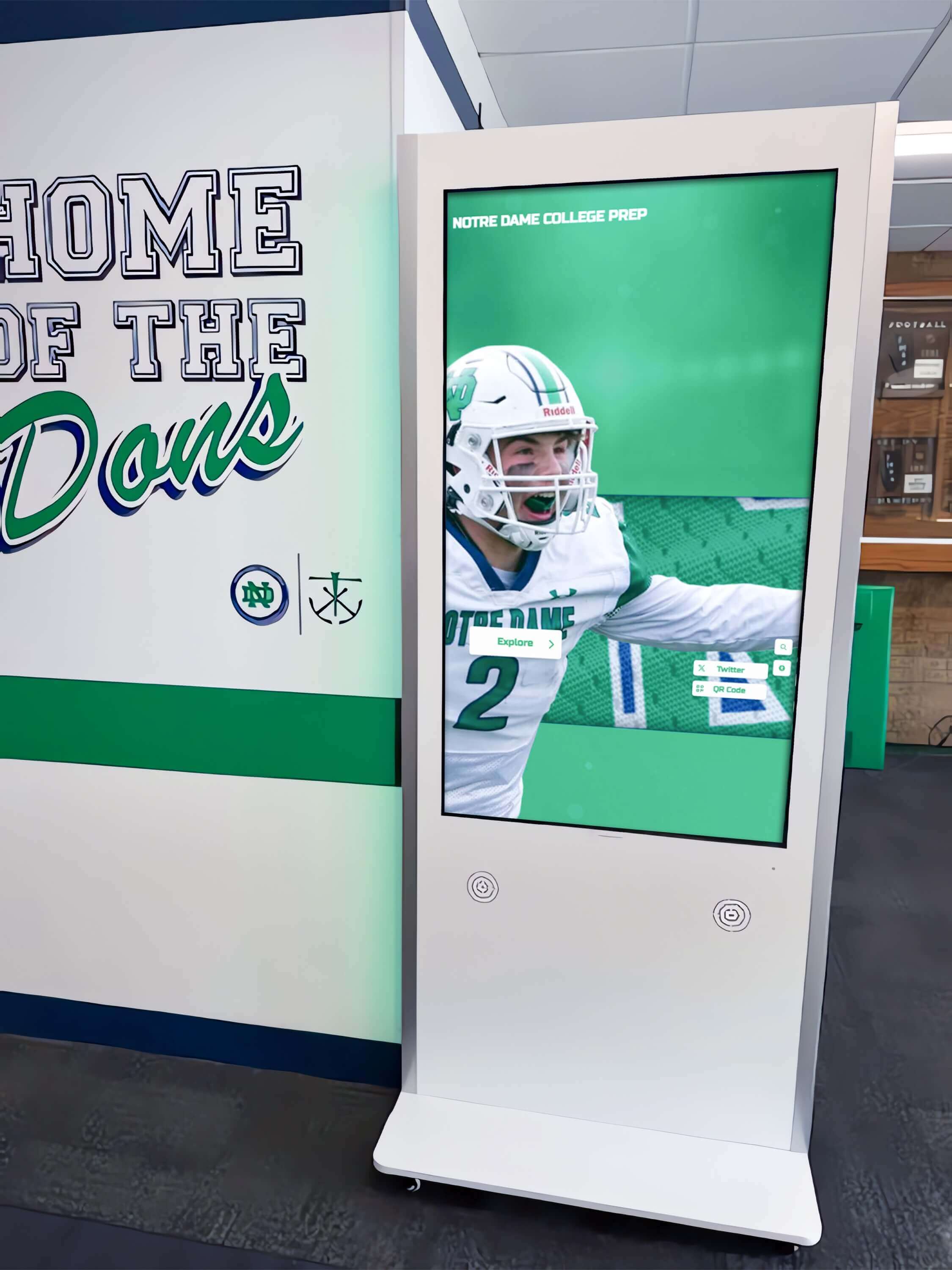
Strategic kiosk placement in high-traffic areas maximizes visibility and accessibility for both emergency communications and daily information needs
Multi-language capabilities ensure emergency information reaches all community members regardless of primary language, particularly important for diverse school communities where significant populations may have limited English proficiency. Visual emergency information supplements text with icons and graphics communicating essential information across language barriers.
Student Resources and School Services
Interactive kiosks function as self-service information terminals reducing administrative burden while providing students convenient access to frequently requested resources and services.
Academic Support and Resource Access Students seeking academic support, counseling services, tutoring programs, or educational resources benefit from interactive kiosks providing detailed information about available services, operating hours, contact information, and access procedures. QR codes generated by kiosks enable students to transfer information to personal devices for later reference, bridging the gap between lobby kiosks and mobile access.
College preparation resources, scholarship databases, career exploration tools, and academic planning information become more accessible through interactive presentation than static postings or buried website pages. The convenience of lobby kiosk access increases utilization of valuable support services that might otherwise remain underutilized due to awareness gaps.
Club and Organization Information Schools supporting dozens of clubs, organizations, and extracurricular activities struggle to provide visibility for all offerings through traditional announcement methods. Interactive kiosks offer unlimited information capacity allowing every organization to showcase its mission, meeting times, contact information, recent activities, and membership requirements.
Searchable organization directories help students discover clubs aligned with their interests that they might never encounter through limited physical bulletin board space. Featured organization rotations ensure new and smaller groups receive visibility alongside established organizations. Digital showcases of club activities and accomplishments celebrate participation while recruiting new members. Schools implementing comprehensive student involvement programs find that strategies similar to National Honor Society recognition approaches extend effectively across diverse extracurricular contexts.
Essential Features and Technical Specifications
Understanding technical specifications and feature requirements ensures school administrators select interactive kiosk solutions matching their operational needs and technical environments.
Hardware Requirements and Specifications
Commercial-grade hardware designed for continuous operation in public spaces differs significantly from consumer displays in durability, longevity, and reliability.
Display Specifications Professional interactive kiosk displays feature commercial-grade panels rated for 16-24 hours daily operation, significantly exceeding consumer display duty cycles. Minimum specifications for school lobby applications include:
- Screen size: 43-75 inches (55-inch recommended for most lobby installations)
- Resolution: 1080p minimum (4K preferred for clarity and detail)
- Touch technology: Capacitive multi-touch with 10+ touch point support
- Brightness: 400-500 nits for indoor lobby environments
- Viewing angle: 178 degrees horizontal and vertical
- Response time: 8ms or faster for smooth touch interaction
- Aspect ratio: 16:9 standard (portrait orientation requires portrait-specific displays)
- Operating hours rating: 16+ hours daily continuous operation
Processing and Connectivity Internal computing systems power interactive experiences and manage connectivity to content management platforms and school networks. Minimum computing specifications include:
- Processor: Intel Core i5 equivalent or better for responsive touch interaction
- RAM: 8GB minimum (16GB recommended for multimedia-heavy content)
- Storage: 128GB SSD minimum (256GB+ for video content caching)
- Operating system: Windows 10/11 IoT or Android enterprise versions
- Network connectivity: Gigabit Ethernet (WiFi backup acceptable)
- Peripheral support: USB ports for keyboard/mouse service access
Remote management capabilities allow IT administrators to update software, troubleshoot issues, monitor system health, and restart systems without physical access to kiosk hardware, reducing maintenance overhead while improving uptime.
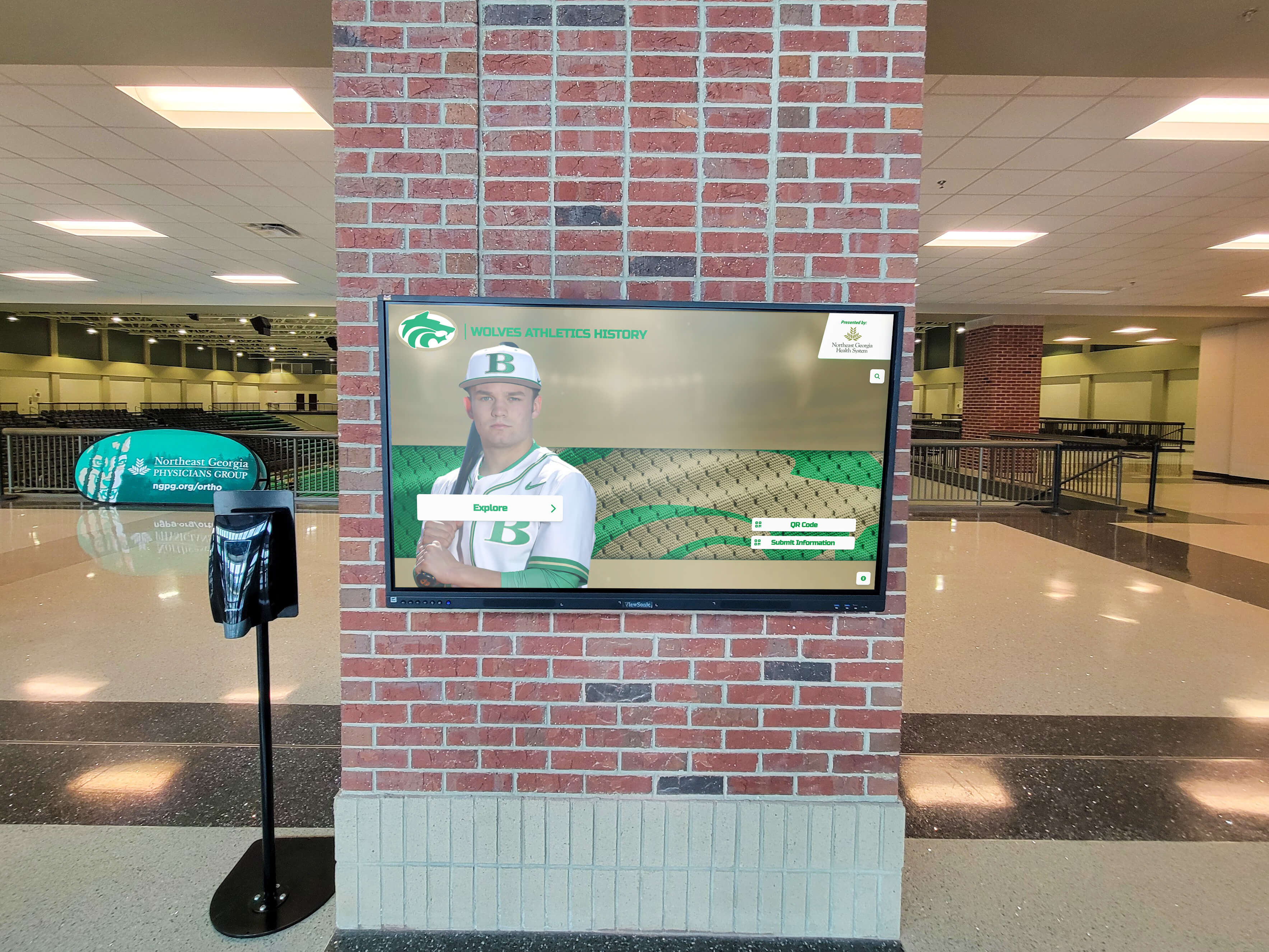
Professional installations integrate displays with existing architecture while ensuring accessibility and durability for high-traffic public spaces
Enclosure and Mounting Considerations
Interactive kiosk installations require protective enclosures and secure mounting appropriate for public school environments where durability and safety considerations differ from corporate settings.
Enclosure Options Interactive kiosk enclosures protect display hardware while providing finished appearances integrating professionally with school aesthetics. Common enclosure types include:
- Freestanding floor kiosks: Self-contained units with built-in display protection, requiring floor space but offering maximum flexibility for placement changes
- Wall-mounted enclosures: Space-efficient installations mounting flush or with minimal projection from walls, ideal for lobbies with limited floor space
- Recessed installations: Displays mounted within wall cavities appearing as seamless architectural elements, though requiring construction accommodations
- Pedestal mounts: Display-only systems on vertical stands providing adjustable height positioning
School installations must prioritize vandal-resistant construction including reinforced corners, tamper-resistant fasteners, cable management preventing access to connections, and optional protective glazing over touchscreens preventing damage from impact or excessive force.
Accessibility Compliance Interactive kiosks in educational settings must comply with ADA accessibility requirements ensuring usable access for individuals with disabilities. Critical accessibility considerations include:
- Height requirements: Touch interaction zones positioned 15-48 inches above floor level for wheelchair access
- Reach depth: Maximum 25-inch forward reach depth for wall-mounted installations
- Clear floor space: Minimum 30x48 inch clear floor space positioned for forward or parallel approach
- Text size: Minimum 3/16-inch character height for readability from typical viewing distances
- Audio output: Optional headphone jacks or directional speakers for screen reader functionality
- High contrast: Interface design with 4.5:1 contrast ratios meeting WCAG 2.1 AA standards
Schools committed to inclusive recognition often discover that accessibility principles developed for programs like varsity letterman award displays translate directly to interactive kiosk implementations ensuring all community members can access and enjoy displayed content.
Software and Content Management Capabilities
Hardware capabilities matter little without robust software platforms enabling effective content creation, management, scheduling, and user interaction design.
Content Management System Requirements Evaluate interactive kiosk software platforms against these essential content management capabilities:
- Cloud-based access: Web-based interfaces allowing content updates from any device without specialized software installations
- Multi-user permissions: Role-based access enabling multiple staff members to update designated content areas without full administrative access
- Template libraries: Pre-designed layouts and templates enabling professional content creation without graphic design expertise
- Media support: Upload and display capabilities for images, videos, PDFs, web content, and document formats
- Scheduling capabilities: Time-based content display enabling different programming for arrival times, lunch periods, dismissal, evening events, and weekends
- Preview functions: Content preview before publishing prevents embarrassing errors reaching public displays
- Version control: Content history tracking enabling rollback to previous versions when errors occur
- Analytics tracking: User interaction data showing which content receives engagement and which gets ignored
Integration Capabilities Interactive kiosk systems delivering maximum value integrate with existing school technology infrastructure rather than requiring duplicate data entry. Priority integration capabilities include:
- Student information system (SIS) integration for calendar synchronization and schedule accuracy
- Active Directory integration for staff directory automation
- Emergency notification system integration for alert broadcasting
- Digital signage network integration for coordinated messaging across multiple displays
- Social media feed integration for community engagement content
- RSS feed support for automatic content updates from external sources
Schools managing comprehensive athletic recognition programs benefit from understanding how student athlete support systems can integrate with recognition displays to promote wellness resources alongside achievement celebrations.
Implementation Planning and Deployment Considerations
Successful interactive kiosk implementations require careful planning addressing technical infrastructure, content strategy, stakeholder engagement, and operational sustainability.
Site Assessment and Installation Planning
Physical environment evaluation and strategic placement decisions significantly impact kiosk visibility, accessibility, and effectiveness.
Location Selection Criteria Identify optimal kiosk placement locations based on multiple factors beyond simple foot traffic volume:
- Visibility: Unobstructed sight lines from main entrance approaches ensuring visitors immediately notice kiosks
- Traffic flow: Placement allowing interaction without blocking primary circulation paths or creating congestion
- Ambient lighting: Avoiding direct sunlight or high-glare positions affecting screen visibility
- Power access: Proximity to electrical outlets reducing installation complexity and cost
- Network connectivity: Wired network access or strong WiFi signal for reliable content management
- Physical security: Locations with natural surveillance deterring vandalism and enabling staff observation
- Accessibility: Clear approach paths and adequate clear floor space for wheelchair access
Main lobby entrances represent ideal primary locations, though additional kiosk placements in athletic facility lobbies, performing arts center entrances, cafeteria areas, and library entrances extend information access and recognition visibility throughout campus.
Content Strategy and Launch Planning
Hardware installation represents only the technical foundation—effective content strategy determines whether kiosks become valuable community resources or ignored technology investments.
Initial Content Development Launch interactive kiosks with comprehensive content establishing immediate value for users while demonstrating system capabilities. Priority launch content includes:
- Current school year calendar with all major events, holidays, and special programs
- Complete staff directory with departments, email contacts, and office locations
- Athletic schedules for all sports teams with game times, locations, and season records
- Recognition content celebrating recent achievements across academics, athletics, and arts
- School services directory covering counseling, health, security, administration, and support resources

Effective staff training and demonstration help school communities understand kiosk capabilities while encouraging engagement with interactive features
Avoid launching with sparse content requiring months to populate fully—incomplete systems communicate that kiosks aren’t priorities and create poor first impressions undermining future adoption. Schools implementing multi-faceted recognition programs discover that frameworks developed for initiatives like 1000-point scorer recognition provide excellent models for comprehensive achievement celebration across interactive platforms.
Ongoing Content Maintenance Plans Assign clear content ownership ensuring designated staff members maintain specific content areas preventing neglect as initial implementation enthusiasm wanes. Effective content maintenance requires:
- Calendar manager responsible for event updates and schedule accuracy
- Recognition coordinator managing achievement showcases and honoree additions
- Communications lead overseeing announcements, news, and promotional content
- IT support maintaining technical functionality and troubleshooting issues
- Executive sponsor monitoring overall system value and strategic alignment
Establish content review cycles ensuring all information receives regular updates—monthly calendar verification, quarterly recognition content refreshes, and annual comprehensive content audits prevent outdated information from accumulating.
Training and Stakeholder Engagement
Technology adoption requires stakeholder understanding of capabilities, comfort with interaction, and awareness of available information.
Staff Training and Adoption Conduct training sessions for all staff members who will interact with kiosk content management systems covering:
- Content management system login and navigation procedures
- Content creation using templates and media upload
- Scheduling and publishing workflows
- Preview and review processes before content goes live
- Troubleshooting common issues and support escalation procedures
Student tours and orientation programs should include kiosk demonstrations showing new students how to access schedules, find services, explore clubs, and view recognition content. Parent orientation sessions similarly demonstrate kiosk capabilities encouraging family engagement with school information and student achievement celebrations.
Community Awareness and Promotion Generate initial kiosk engagement through awareness campaigns communicating system capabilities and value:
- Announcement emails explaining kiosk features and encouraging exploration
- Social media posts showcasing interesting content and interaction capabilities
- Student newspaper or newsletter coverage introducing system to school community
- Signage near kiosks explaining available features and encouraging interaction
- Staff modeling through regular kiosk use demonstrating system value
Monitor early usage through analytics identifying which content attracts engagement and which remains ignored, adjusting content strategy based on actual user behavior rather than assumptions about preferences.
Buying Guide: Evaluating Vendors and Solutions
Interactive kiosk procurement requires careful vendor evaluation balancing initial costs against long-term value, support quality, and operational sustainability.
Total Cost of Ownership Analysis
Interactive kiosk pricing varies dramatically based on hardware specifications, software capabilities, installation requirements, and ongoing support arrangements.
Upfront Investment Components Comprehensive kiosk system costs include multiple elements beyond display hardware alone:
- Hardware costs: Display, computing system, enclosure, mounting hardware ($3,000-$12,000 per unit depending on size and specifications)
- Software licensing: Content management system access (varies from included to $500-$2,000 annually per display)
- Installation services: Professional mounting, electrical work, network connectivity ($500-$2,500 per unit depending on complexity)
- Initial content development: Custom graphics, templates, content creation ($1,000-$5,000 depending on customization level)
- Training and setup: Staff training, system configuration, documentation ($500-$2,000)
Total installed costs for professional school lobby interactive kiosk installations typically range from $6,000-$20,000 per unit with 55-inch systems averaging $10,000-$12,000 installed and operational.
Ongoing Operational Costs Beyond initial installation, budget for recurring costs ensuring long-term operational sustainability:
- Software subscriptions: Annual CMS licensing fees if not perpetual licenses
- Maintenance contracts: Hardware service agreements covering repairs and replacement
- Content management: Staff time required for ongoing content updates and maintenance
- Electricity: Continuous operation power consumption (typically $100-$200 annually)
- Network connectivity: Dedicated network infrastructure if required
Calculate five-year total cost of ownership including both upfront and recurring costs when comparing vendor proposals and solution options.
Vendor Selection Criteria
Evaluate interactive kiosk vendors against multiple criteria beyond lowest initial price, recognizing that vendor partnership quality significantly impacts long-term satisfaction.
Vendor Evaluation Factors Assess prospective vendors against these critical criteria:
Experience and References
- Documented experience with school and educational institution deployments
- Client references from similar organizations (size, region, use cases)
- Case studies demonstrating successful implementations with measurable outcomes
- Portfolio showing professional installation quality and design capabilities
Technical Capabilities
- Hardware quality using commercial-grade components designed for continuous operation
- Software platform flexibility accommodating diverse content types and use cases
- Integration capabilities connecting with existing school technology systems
- Security features protecting student data and preventing unauthorized access
Support and Service
- Training quality and comprehensiveness ensuring staff competence
- Ongoing support availability including response time commitments
- Remote troubleshooting capabilities reducing on-site service visit needs
- Hardware warranty coverage including parts, labor, and replacement display commitments
- Software update frequency ensuring ongoing feature improvements and security patches
Long-Term Viability
- Company stability and financial strength indicating sustainable business operations
- Product roadmap demonstrating ongoing platform investment rather than static solutions
- User community size suggesting robust customer base supporting continued development
- Upgrade pathways allowing future capability expansion without complete system replacement
Schools pursuing comprehensive recognition strategies often discover that vendors experienced with memorial recognition implementations bring valuable sensitivity and design expertise applicable across diverse acknowledgment contexts.
Request for Proposal Considerations
Formal procurement processes require detailed RFPs communicating requirements clearly while enabling meaningful vendor proposal comparisons.
Essential RFP Components Structure interactive kiosk RFPs to elicit comprehensive proposals addressing all critical implementation aspects:
- Project overview: School description, implementation objectives, success criteria
- Technical requirements: Hardware specifications, software capabilities, integration needs
- Installation requirements: Locations, quantities, timeline expectations, site constraints
- Content requirements: Initial content scope, ongoing management expectations, customization needs
- Support requirements: Training scope, maintenance coverage, response time expectations
- Pricing structure: Request separated pricing for hardware, software, installation, training, and support enabling component comparison
- Qualification requirements: Minimum experience levels, reference requirements, financial stability documentation
- Evaluation criteria: Weighted scoring methodology communicating decision priorities
Request demonstration appointments allowing evaluation committees to interact with proposed solutions directly rather than relying solely on written specifications and marketing materials.
Maximizing Interactive Kiosk Value and Community Impact
Technology investments deliver maximum value when implemented strategically as components of comprehensive communication and engagement approaches rather than isolated solutions.
Integrating Kiosks with Broader Communication Strategies
Interactive kiosks work most effectively when coordinated with other communication channels creating cohesive information ecosystems rather than competing or duplicated messaging.
Multi-Channel Information Distribution Coordinate kiosk content with school websites, mobile apps, social media, email communications, and traditional print materials ensuring consistent messaging across all touchpoints. Use each channel’s strengths—kiosks excel at in-building information access and interactive exploration, websites provide detailed information and remote access, mobile apps enable personal notifications, and social media drives community conversation.
QR codes displayed on kiosk screens enable seamless transitions from lobby kiosks to mobile devices, allowing visitors to capture information for later reference or share interesting content with others who weren’t physically present. This bridge between physical and digital access extends kiosk value beyond the immediate lobby environment.

Intuitive touch interfaces encourage exploration and discovery while making school information and achievement celebrations accessible to diverse community stakeholders
Measuring Success and Demonstrating Value
Justify interactive kiosk investments through data demonstrating measurable community impact and operational improvements.
Quantitative Success Metrics Track measurable indicators showing kiosk utilization and value:
- Interaction volume: Total touch interactions, unique sessions, and average session duration indicating engagement levels
- Content popularity: View counts by content category identifying high-value information and underutilized content areas
- Time distribution: Usage patterns by time of day and day of week informing content scheduling strategies
- Search queries: Popular search terms revealing information needs and content gaps
- QR code scans: Mobile content transfers indicating desire for persistent access beyond immediate kiosk interaction
Qualitative Impact Assessment Complement quantitative data with qualitative feedback gathering stakeholder perceptions:
- Staff surveys assessing whether kiosks reduce repetitive information requests and directional questions
- Visitor feedback during school tours evaluating first impressions and information accessibility
- Student focus groups exploring content preferences and desired feature additions
- Parent feedback through communication channels gauging awareness and utilization
Regular impact assessment demonstrates value while informing continuous improvement ensuring kiosk systems evolve with changing community needs and expectations. Schools implementing comprehensive programs often find that evaluation frameworks developed for specialized initiatives like athletic program optimization translate effectively to technology implementation assessment.
Future-Proofing Interactive Kiosk Investments
Technology investments require forward-thinking planning ensuring systems remain valuable as capabilities evolve and user expectations change.
Scalability Planning Begin with focused deployments in highest-impact locations while designing systems allowing future expansion without architectural changes. Network infrastructure, content management platforms, and software licensing should accommodate additional displays added later without requiring platform migrations or complete system redesigns.
Standardize on platforms supporting both interactive kiosks and passive digital displays enabling mixed deployments where some locations warrant full interactive capabilities while others need only information broadcasting. Unified content management across device types reduces operational complexity while maximizing content creation efficiency.
Emerging Capability Integration Monitor emerging interactive technologies considering future integration opportunities enhancing kiosk value:
- Mobile integration: Personal device connectivity enabling content transfer and personalized experiences
- Data analytics: Advanced interaction analysis providing deeper insight into user behavior and content effectiveness
- AI assistance: Voice interfaces and intelligent search helping users find information more efficiently
- Accessibility enhancements: Improved screen reader support, language translation, and assistive technology integration
- Social features: Content sharing enabling users to distribute interesting discoveries to broader audiences
Select vendors demonstrating platform investment and feature evolution rather than static solutions unlikely to incorporate advancing capabilities over multi-year deployment lifespans.
Transforming School Lobbies Through Interactive Technology
Interactive digital signage kiosks represent strategic investments transforming underutilized lobby spaces into dynamic community engagement hubs serving multiple simultaneous functions—visitor information, student recognition, community celebration, resource access, and emergency communication. Successful implementations require thoughtful planning balancing technical capabilities, content strategy, stakeholder engagement, and operational sustainability.
The most effective school kiosk deployments extend beyond simple technology installations to become integral components of school communication ecosystems providing value for diverse stakeholders—students discovering club opportunities and viewing peer achievements, visitors navigating unfamiliar buildings and accessing school information, parents staying informed about events and schedules, staff reducing repetitive information requests, and administrators broadcasting important announcements reaching everyone simultaneously.
Interactive kiosks shine particularly brightly in recognition applications where traditional static approaches fail to capture attention or inspire current students. Digital recognition displays honor achievement through engaging multimedia presentations accessible to the entire school community rather than locked behind glass cases ignored by hurrying students. Recognition becomes dynamic rather than static, searchable rather than sequential, and engaging rather than forgettable.
Rocket Alumni Solutions specializes in interactive recognition systems designed specifically for schools, providing turnkey solutions combining professional displays, intuitive content management, and comprehensive support enabling schools to celebrate community achievements while strengthening institutional culture. Our platform serves hundreds of schools nationwide delivering the recognition technology and ongoing partnership ensuring long-term success transforming lobby spaces into vibrant community hubs.
Investment in interactive digital signage kiosks represents commitment to community engagement, recognition excellence, and operational efficiency—transforming school lobbies from transition spaces into destinations where community members gather, explore, and connect with the vibrant institutions serving students, families, and broader communities.































