School lobbies and main entrances serve as the first impression for prospective families, the daily gathering point for students and staff, and the primary communication hub where important information reaches the entire school community. Yet most educational facilities still rely on static bulletin boards cluttered with outdated flyers, whiteboard announcements that get erased before everyone sees them, and trophy cases that tell only fragments of the school’s story.
A digital display board positioned strategically in school lobbies and entrances transforms these spaces from passive corridors into dynamic communication centers that welcome visitors, celebrate student achievements, share critical announcements instantly, and create visual engagement that reflects the school’s energy and values. The challenge isn’t whether digital displays benefit schools—it’s selecting the right technology, implementing effective content strategies, and maintaining displays that continue engaging communities long after initial installation excitement fades.
Modern digital display boards range from simple announcement screens to sophisticated interactive touchscreen systems that invite exploration, provide building wayfinding, showcase student work, recognize achievements, and strengthen community connections in ways static displays never could. Understanding the options, costs, and best practices helps schools invest in solutions that deliver lasting value rather than expensive technology that underperforms expectations.
School administrators, communications directors, and facilities managers considering digital display boards face practical questions about hardware specifications, content management systems, installation requirements, and ongoing maintenance responsibilities. This comprehensive guide explores everything schools need to know to select, implement, and maximize digital display technology that transforms lobbies and entrances into vibrant communication hubs serving the entire school community.

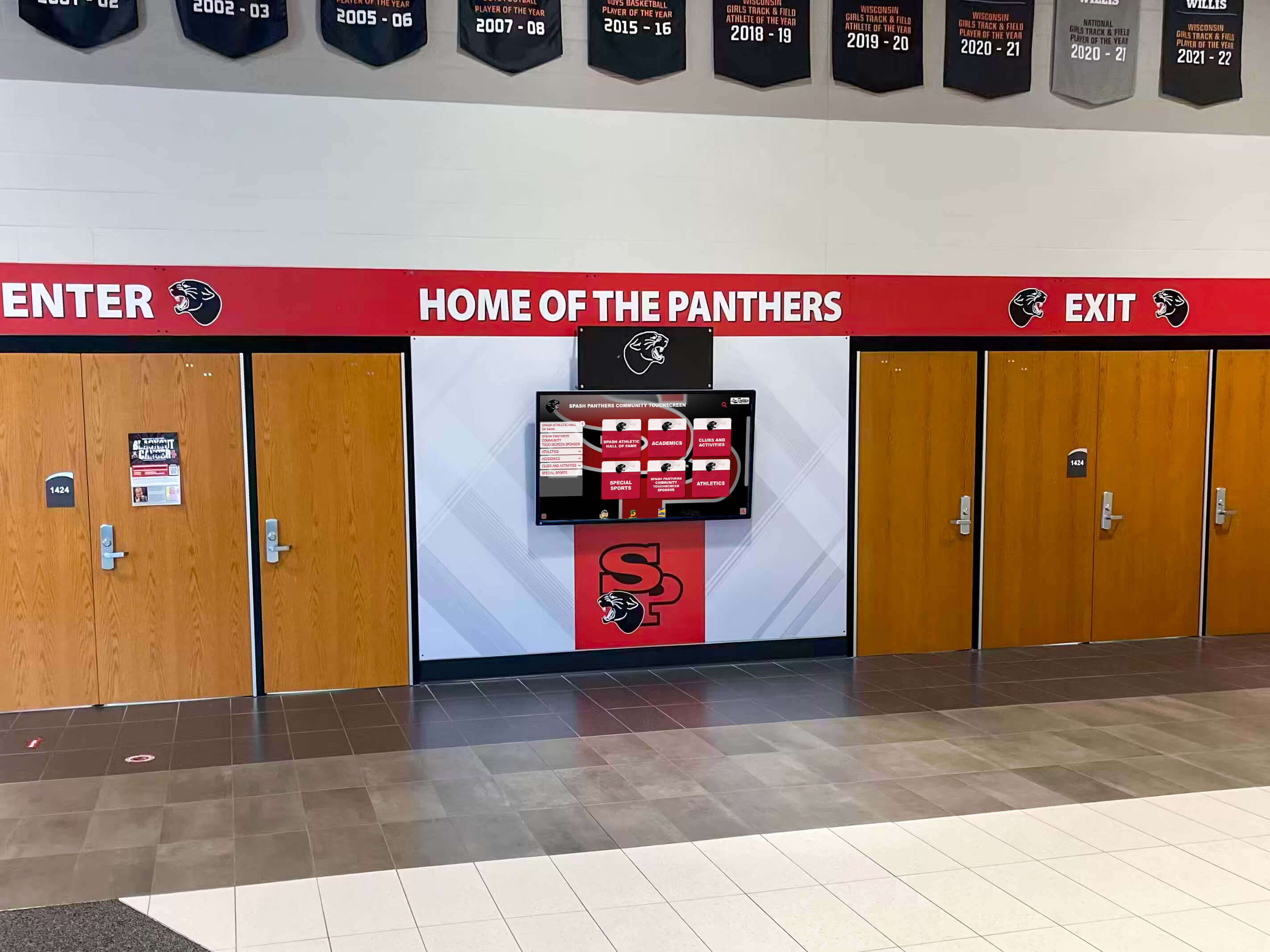
Strategic placement of digital display boards near main entrances creates immediate visual impact for visitors while providing [communication infrastructure](https://donorswall.com/blog/school-lobby-ideas-creating-welcoming-inspiring-spaces/?utm_source=organic&utm_medium=seo-auto&utm_content=digitalwarming&utm_campaign=digital-display-board&utm_term=seo) for daily announcements
Understanding Digital Display Board Options for Schools
Educational facilities can choose from several distinct digital display technologies, each offering specific advantages for lobby and entrance applications. Selecting appropriate technology depends on intended use cases, budget constraints, and desired interactivity levels.
Standard Digital Signage Displays
The most common digital display board type consists of commercial-grade LCD or LED screens running content management software that displays scheduled announcements, event calendars, student achievements, emergency alerts, and rotating visual content. These displays function like sophisticated digital bulletin boards that replace paper announcements with dynamic, eye-catching media.
Standard digital signage typically uses screens ranging from 43 to 75 inches measured diagonally, with larger sizes providing better visibility in spacious lobbies or for viewers at greater distances. Commercial displays designed for continuous operation outlast consumer televisions significantly—commercial panels include industrial-grade components, superior heat dissipation, and warranties covering 16+ hours daily operation compared to residential screens designed for intermittent home use.
Content management for standard signage ranges from simple USB-based players that display pre-loaded slideshows to sophisticated cloud-based systems allowing remote content updates from any internet-connected device. Entry-level solutions cost $1,500 to $3,000 for complete systems including display, mounting hardware, and basic content software, while enterprise platforms supporting multiple screens across district-wide deployments run $5,000 to $15,000+ per location depending on feature requirements.
Schools selecting standard digital signage should prioritize brightness specifications—displays in sun-exposed lobbies require 400+ nits brightness to remain visible in natural light, while interior hallways function adequately with 250-350 nit panels. Resolution matters less for announcement content viewed from distances beyond 10 feet, where standard 1080p HD suffices, though 4K panels provide sharper text and future-proof investments as content expectations evolve.
Interactive Touchscreen Kiosks
Interactive touchscreen displays transform passive viewing into active engagement, allowing students, staff, and visitors to explore content through touch navigation. These kiosks excel at applications requiring user choice—building directories helping visitors locate specific classrooms or offices, searchable student achievement databases, interactive school histories, campus maps, event calendars with detailed information, and recognition platforms showcasing individual student or alumni profiles.

Interactive touchscreen technology enables [building wayfinding and recognition applications](https://touchwall.us/blog/touchscreen-building-directory/?utm_source=organic&utm_medium=seo-auto&utm_content=digitalwarming&utm_campaign=digital-display-board&utm_term=seo) that engage visitors actively rather than passively
Touchscreen kiosks typically use capacitive touch technology (the same responsive interface as smartphones) rather than older resistive touch systems requiring pressure. Screen sizes for lobby kiosks commonly range from 43 to 55 inches—smaller than many passive displays because users stand closer during interaction. Mounting options include floor-standing kiosks with integrated enclosures or wall-mounted installations that save floor space while requiring adequate wall structure for support.
Content for interactive displays requires custom development or specialized platforms designed specifically for touchscreen navigation. Schools cannot simply repurpose PowerPoint presentations or passive content for interactive use—effective touch interfaces need clear navigation buttons, intuitive menu structures, responsive touch targets sized appropriately for fingers rather than mouse cursors, and content architecture that helps users find information quickly without getting lost in complex menus.
Complete interactive kiosk systems including commercial touchscreen display, protective enclosure, mounting hardware, and content platform typically cost $8,000 to $25,000 depending on screen size, enclosure quality, and software sophistication. The higher investment compared to passive displays reflects specialized hardware and custom content development requirements that create genuinely engaging interactive experiences.
Video Wall Installations
Schools with large entrance lobbies or expansive wall space can create dramatic visual impact through video wall installations combining multiple displays into unified large-format presentations. Video walls use specialized commercial displays with ultra-narrow bezels (the frame around each screen) that minimize visual interruption between adjacent panels, creating nearly seamless large images when multiple screens tile together.
Typical video wall configurations use 2x2 (four screens), 3x3 (nine screens), or custom arrangements matching available wall dimensions. Individual panels measure 46 to 55 inches most commonly, creating combined displays spanning 8 to 15+ feet across. The impressive scale commands attention even in busy, high-traffic environments where smaller displays might go unnoticed.
Content for video walls requires either specialized software that manages content distribution across multiple screens or video processors that split single large images across panel arrays. Schools planning video walls should budget for both hardware and content production—impressive displays need compelling visual content to justify the investment, often requiring professional design services to create graphics, videos, and animations that leverage the unique large format effectively.
Video wall costs escalate quickly with panel count. Basic 2x2 installations start around $12,000 to $20,000 for displays, mounting systems, and control hardware. Larger 3x3 configurations run $30,000 to $60,000+ for complete systems. Installation complexity also increases with panel count, requiring specialized mounting systems, precise alignment for minimal bezel gaps, and coordinated electrical/network infrastructure for multiple displays.
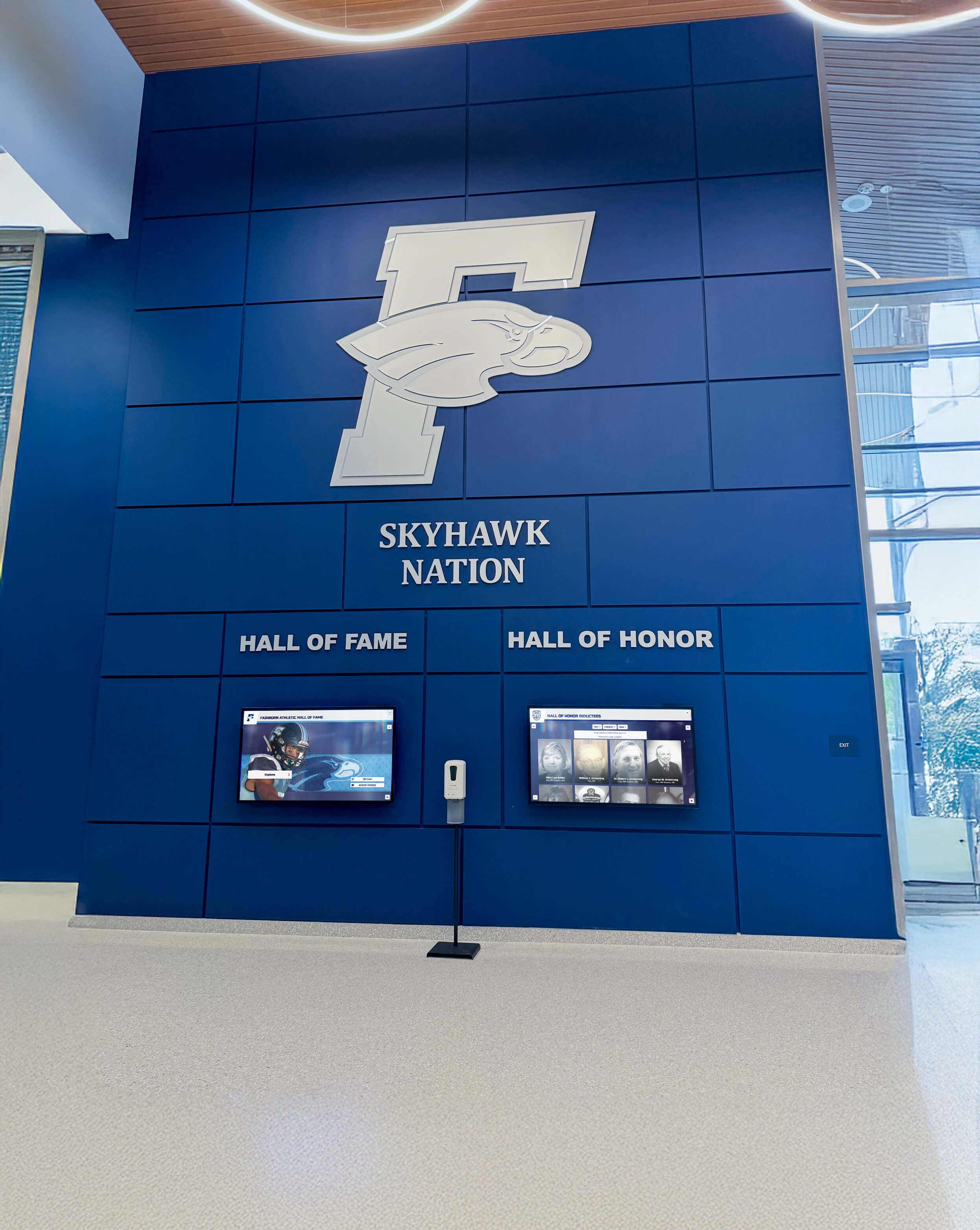
Integrated lobby designs combine [digital display technology with architectural branding](https://touchhalloffame.us/blog/school-entrance-design-ideas/?utm_source=organic&utm_medium=seo-auto&utm_content=digitalwarming&utm_campaign=digital-display-board&utm_term=seo) for cohesive, impressive presentations
Content Strategies That Maximize Display Engagement
Hardware represents only half of successful digital display board implementation—compelling content determines whether displays become valued communication assets or ignored background noise. Schools need sustainable content strategies that keep displays fresh, relevant, and engaging throughout the academic year.
Daily Announcements and Event Calendars
The most fundamental content application displays daily announcements, upcoming events, menu information, bell schedules, and time-sensitive communications reaching students and staff. Digital displays excel at this role because content updates happen instantly without printing, posting, or distributing paper announcements that quickly become outdated.
Effective announcement content follows design principles that prioritize readability and information hierarchy. Text should be large enough to read from typical viewing distances—generally 60-point font minimum for body text, larger for headlines. Information density should remain conservative—trying to fit too much text on screens creates cluttered layouts that viewers skip rather than read carefully. Better approaches rotate through multiple screens displaying different information categories rather than cramming everything onto single crowded displays.
Color choices significantly impact announcement effectiveness. High contrast between text and backgrounds ensures readability—dark text on light backgrounds or light text on dark backgrounds work well, while low-contrast combinations (light gray text on white backgrounds) create readability challenges, particularly for viewers with vision impairments. School brand colors can accent designs without compromising readability when used thoughtfully for headers, dividers, or highlight elements rather than body text backgrounds.
Animation and transitions should enhance rather than distract from content. Subtle slide transitions between different announcements work well; excessive animation, scrolling text, or flashy effects make content harder to read and create visual fatigue. The goal is clear communication, not maximum visual stimulation.
Student Achievement Recognition
Digital displays positioned in prominent lobby locations provide perfect venues for celebrating student achievements across academics, athletics, arts, service, and leadership. Recognition content creates positive school culture, motivates continued excellence, and demonstrates institutional values to visitors who see what the school celebrates and honors.
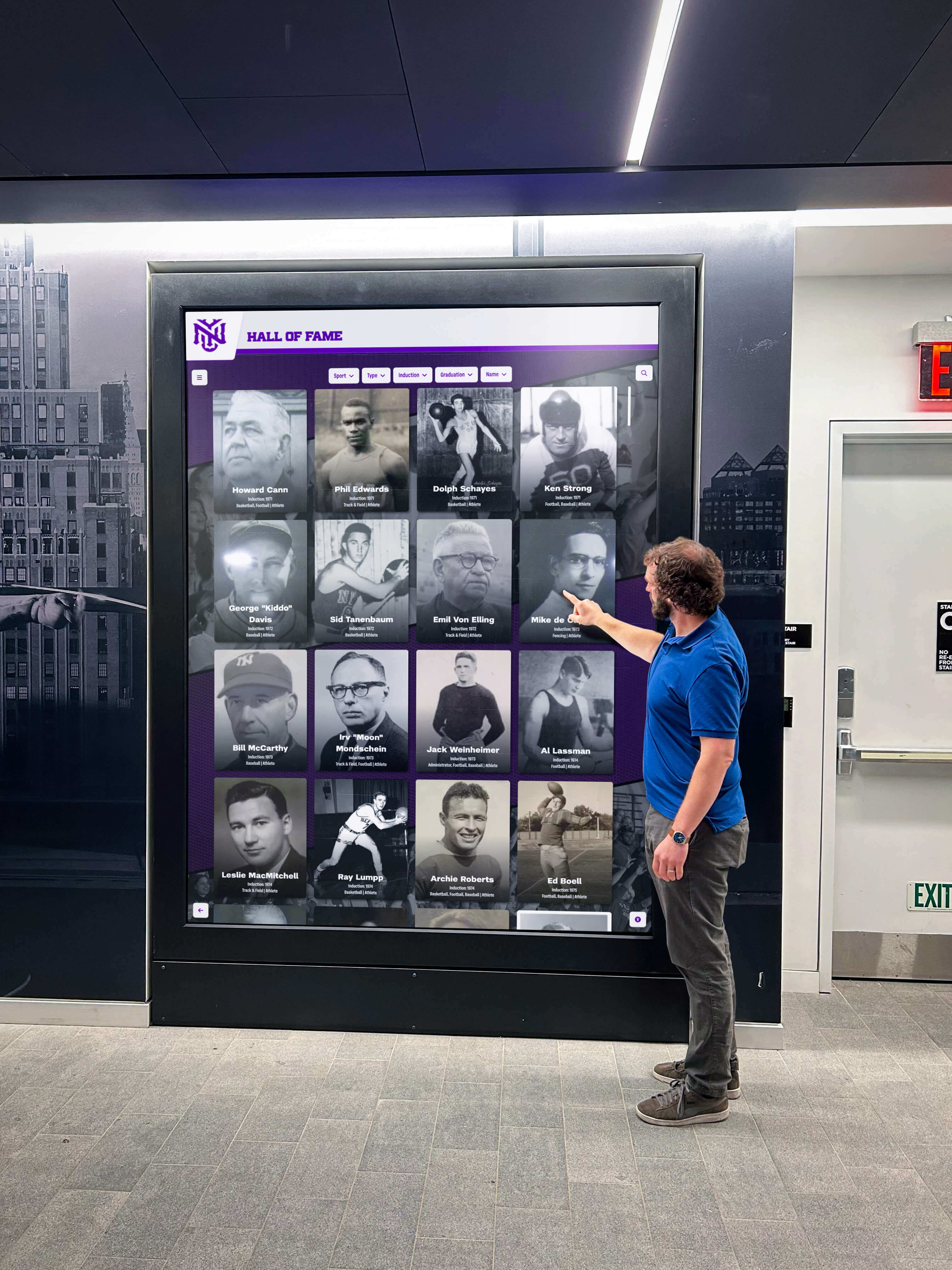
Recognition displays create [engagement opportunities](https://touchscreenwebsite.com/blog/interactive-touch-screen-display-options-educational-facilities/?utm_source=organic&utm_medium=seo-auto&utm_content=digitalwarming&utm_campaign=digital-display-board&utm_term=seo) that strengthen school pride and community connection
Student recognition content can include honor roll listings updated each grading period, athlete of the week features with photos and accomplishments, performing arts achievements and upcoming shows, academic competition results, scholarship award announcements, college acceptance celebrations, and service hour milestones. The variety of recognition categories ensures diverse students see themselves celebrated rather than displays exclusively highlighting athletic or academic achievements alone.
Photo-based recognition creates significantly more impact than text-only listings. Student portraits, action shots from performances or competitions, and candid photos from school events make recognition personal and immediately recognizable to students and families. Schools should establish photo collection workflows that capture quality images from various activities throughout the year rather than scrambling for photos when creating recognition content.
Privacy considerations matter for student recognition displays. Schools should obtain appropriate permissions for displaying student names, photos, and achievements publicly, particularly for images or information about minor students. Clear policies about what gets displayed publicly versus internally, parental opt-out options, and thoughtful handling of sensitive situations (students in foster care, protection orders, etc.) protect student safety while enabling positive recognition.
Emergency Communications and Safety Alerts
Digital display boards provide critical infrastructure for emergency communications during safety incidents, weather events, or unexpected school closures. The ability to instantly push alerts to all displays simultaneously ensures rapid information distribution when timing matters most.
Emergency alert functionality requires content management systems with priority override capabilities—emergency messages should interrupt regular programming automatically when administrators trigger alerts, ensuring critical information reaches viewers immediately regardless of scheduled content. After emergencies resolve, displays should return to normal programming automatically or remain on emergency screens until manually cleared by authorized administrators.
Alert content should follow established emergency communication protocols including clear, concise messaging stating what is happening, what actions students and staff should take, and where to find additional information. Visual design for emergency content should differ dramatically from regular displays—distinctive colors (often red backgrounds), larger text, and prominent alert indicators help viewers immediately recognize emergency communications versus routine announcements.
Schools implementing emergency alert capabilities should integrate digital displays with broader emergency communication systems including PA announcements, automated phone/email alerts, and mobile app notifications. Multiple communication channels ensure messages reach all community members regardless of whether they’re viewing displays at alert activation time.
Community Building and School Culture Content
Beyond functional announcements and recognition, digital displays can strengthen school culture through content celebrating traditions, sharing historical moments, highlighting unique programs, featuring student artwork or creative writing, showcasing alumni success stories, and creating visual identity that reinforces institutional values and community bonds.
Weekly or monthly themes create content variety that keeps displays interesting throughout the year. Themes might highlight different academic departments each month, feature various student clubs rotating weekly, celebrate cultural heritage months, recognize different staff roles, or count down to major school events. Themed content provides structure for content planning while ensuring displays showcase the full breadth of school community rather than focusing narrowly on limited topics.
Student involvement in content creation develops leadership skills while ensuring displays reflect student perspectives. Student communications teams, media classes, or dedicated digital signage crews can research topics, conduct interviews, create graphics, film video segments, and manage content calendars under faculty supervision. Student-created content often resonates more authentically with peer audiences than adult-produced materials.
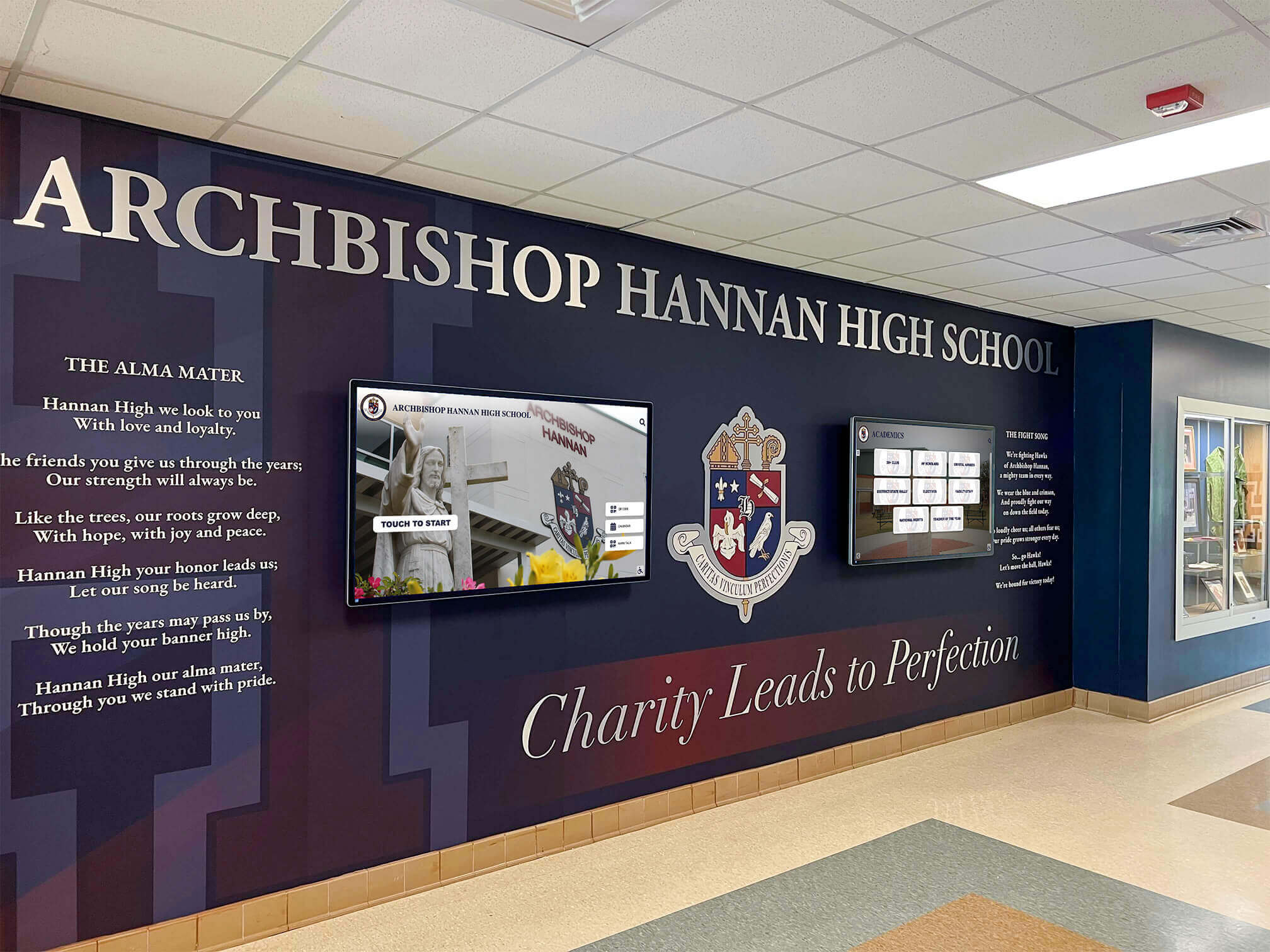
Comprehensive lobby designs integrate [digital signage with architectural elements](https://digitalrecordboard.com/blog/digital-signage-for-schools-complete-guide-provider-ranking/?utm_source=organic&utm_medium=seo-auto&utm_content=digitalwarming&utm_campaign=digital-display-board&utm_term=seo) for cohesive branded environments
Technical Specifications and Hardware Selection
Selecting appropriate digital display board hardware requires understanding technical specifications that affect performance, longevity, and suitability for specific school environments.
Screen Technology: LCD vs. LED vs. OLED
Most digital display boards use LCD (Liquid Crystal Display) technology with LED backlighting—often marketed confusingly as “LED displays” though the actual display technology remains LCD. These panels offer excellent brightness, good color accuracy, proven reliability, and reasonable pricing making them standard choices for school installations.
True LED displays use arrays of individual light-emitting diodes rather than LCD panels with LED backlights. LED technology appears primarily in outdoor displays or very large video walls where individual LED modules tile together. LED offers superior brightness for sunlit environments and pixel pitch flexibility allowing enormous displays, but costs significantly more than LCD for typical indoor school applications.
OLED (Organic LED) technology provides superior contrast and color accuracy through self-emitting pixels that produce their own light without backlighting. OLED delivers stunning image quality but costs substantially more than LCD while suffering shorter lifespan and potential image retention issues when displaying static content continuously—exactly what school announcement displays typically show. For most school applications, commercial LCD panels provide better value and longevity than OLED alternatives.
Brightness and Ambient Light Considerations
Display brightness, measured in nits (candelas per square meter), determines visibility in different lighting conditions. Schools must match panel brightness to installation environment ambient light levels—insufficient brightness makes displays unreadable while excessive brightness wastes energy and creates viewer discomfort in dim spaces.
Main entrance lobbies with large windows, skylights, or direct sunlight exposure require high-brightness panels rated 400 to 700+ nits to remain visible during daylight hours. Interior hallways with standard overhead lighting function well with 300 to 400 nit displays. Displays in consistently dim spaces like auditorium lobbies need only 250 to 350 nits.
Anti-glare screen treatments help displays in bright environments by diffusing reflected light that otherwise creates mirror-like glare obscuring content. Matte anti-glare coatings work well but slightly reduce perceived sharpness compared to glossy screens; slight texture diffuses reflections while maintaining acceptable image quality for announcement content viewed from typical distances.
Resolution Requirements for Viewing Distance
Display resolution determines image sharpness and text clarity, but requirements vary based on typical viewing distances in lobby and entrance applications.
Standard 1080p HD resolution (1920 x 1080 pixels) suffices for displays viewed from 10+ feet distance—the typical scenario for lobby announcement boards. Text remains crisp and graphics appear sharp at these distances without requiring higher resolution panels. Schools can save budget by selecting 1080p commercial displays rather than more expensive 4K alternatives when viewing distances allow.
4K resolution (3840 x 2160 pixels) benefits displays viewed from closer distances, particularly interactive touchscreens where users stand 2 to 4 feet from screens. Higher resolution also helps displays showing detailed graphics, fine text, or content originally created for 4K that would lose quality when downscaled to 1080p.
Practical guidance: displays 55 inches and smaller viewed from 10+ feet work well at 1080p; displays 65+ inches or touchscreen installations benefit from 4K resolution for optimal clarity.
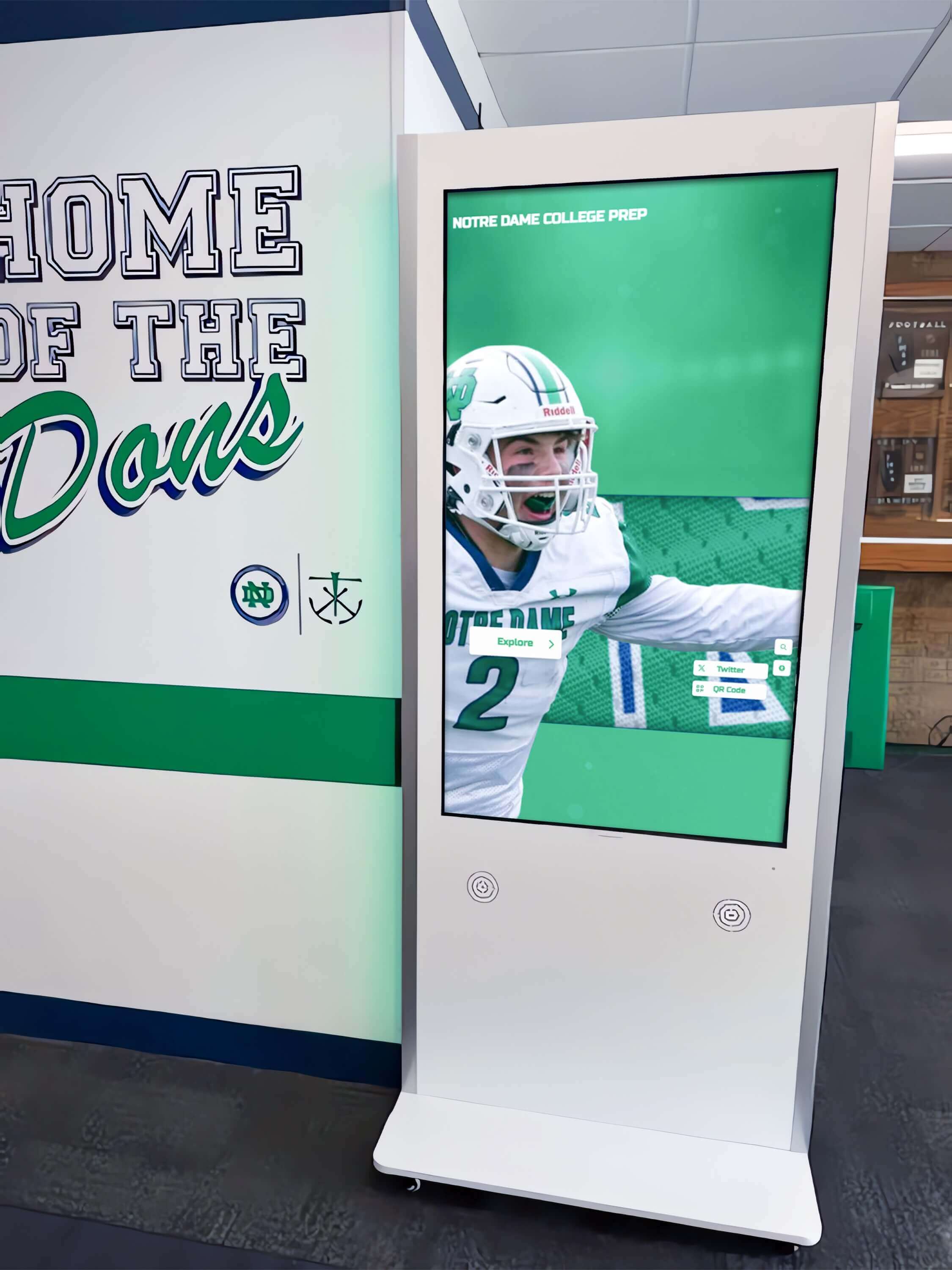
Hallway installations require [hardware specifications](https://touchwall.us/blog/types-of-screens-used-for-digital-signage/?utm_source=organic&utm_medium=seo-auto&utm_content=digitalwarming&utm_campaign=digital-display-board&utm_term=seo) matched to ambient lighting and viewing distances
Commercial vs. Consumer Display Panels
Consumer televisions cost significantly less than commercial displays with similar screen sizes and resolution, tempting budget-conscious schools to deploy residential equipment in school environments. This approach typically creates problems that negate initial savings.
Commercial displays include industrial-grade components designed for 16 to 24 hours daily operation in demanding environments. Commercial panels feature robust power supplies, enhanced cooling systems, reinforced construction, landscape and portrait orientation support, commercial warranties covering continuous use, and integration features like RS-232 control ports and commercial content management compatibility.
Consumer televisions use components designed for residential environments with intermittent usage patterns—perhaps 4 to 6 hours daily in climate-controlled homes. Running consumer panels 12+ hours daily in school hallways rapidly accelerates component failure. Consumer warranties typically exclude commercial use, leaving schools without recourse when panels fail prematurely.
Consumer displays also include features unnecessary for digital signage—built-in streaming apps, multiple HDMI inputs, complex on-screen menus, remote controls—while lacking commercial integration features. Consumer panels may not support portrait orientation, often lack mounting options compatible with commercial hardware, and include automatic brightness adjustments or energy-saving modes that interfere with signage applications.
Initial cost savings rarely justify these limitations. A consumer 55-inch 4K TV might cost $400 to $600 while an equivalent commercial panel runs $800 to $1,200, but the commercial display lasts 5 to 8+ years under continuous school operation while consumer panels often fail within 18 to 36 months, ultimately costing more through repeated replacement.
Installation Considerations and Requirements
Successful digital display board implementation requires careful planning for physical installation, electrical infrastructure, network connectivity, and ongoing maintenance access.
Mounting Location and Height
Display mounting height significantly affects visibility and user experience. Wall-mounted announcement displays should position screen centers at 60 to 66 inches from floor level—roughly eye height for average adult viewers. This height remains visible for both seated and standing viewers while staying below typical ceiling heights that would require uncomfortable upward viewing angles.
Interactive touchscreen kiosks mount lower than passive displays to accommodate touch interaction. Floor-standing kiosks typically position screen centers at 48 to 54 inches to enable comfortable touch access for diverse user heights including students, wheelchair users, and tall adults. Wall-mounted interactive displays should follow similar center heights, balancing accessibility against adequate structural support for heavy touchscreen panels.
Viewing angle considerations affect placement relative to traffic flow. LCD displays maintain good visibility within roughly 45-degree angles left and right of perpendicular; viewers at sharper angles experience color shift and contrast reduction. Displays should face perpendicular to primary traffic flows—mounting displays at hallway endpoints where approaching viewers see screens head-on works better than mounting along hallway sides where most traffic passes at sharp angles.
Clearance requirements prevent physical damage and ensure ADA compliance. Wall-mounted displays should clear floor level by at least 27 inches to prevent wheelchair footrests or cleaning equipment from damaging screens. Floor-standing kiosks need adequate space surrounding installations—typically 30 to 48 inch clearance on approaching sides—to prevent creating trip hazards or blocking required egress paths.
Electrical and Network Infrastructure
Digital displays require reliable electrical power and often need network connectivity for content management and updates.
Electrical requirements vary by display size and type. Typical 43 to 55-inch commercial displays draw 150 to 250 watts during operation, while larger 65 to 75-inch panels consume 250 to 400 watts. Interactive displays with integrated computers draw additional power. Schools should provide dedicated electrical circuits for display installations rather than sharing circuits with other equipment to prevent overloading and ensure continuous operation.
Proper electrical installation includes surge protection, appropriate wire gauges for current draw and circuit run length, code-compliant boxes and conduit, and grounded outlets preventing potential damage from power fluctuations. Licensed electricians should handle all electrical work to ensure code compliance, proper installation, and warranty coverage.
Network connectivity enables remote content updates, cloud-based content management, and centralized control across multiple displays. Wired Ethernet connections provide most reliable connectivity for fixed display installations—running CAT6 cabling from network switches to display locations during installation ensures consistent performance and avoids wireless interference issues.
Wireless connectivity via WiFi works for installations where running ethernet cables proves impractical or cost-prohibitive, though wireless connections may experience occasional dropouts, bandwidth constraints, or interference from congested school networks. Schools deploying displays via WiFi should verify adequate signal strength at installation locations and prioritize quality of service for display network traffic.
Accessibility and Safety Compliance
School installations must comply with ADA accessibility requirements and safety regulations protecting students and visitors.
Mounting security prevents displays from becoming tip-over hazards or targets for theft. Wall-mounted displays require secure attachment to structural wall members (studs, blocking, or masonry) rather than drywall alone. Security hardware may include tamper-resistant mounting brackets, locked wall plates, or theft-deterrent enclosures for high-value installations.
Floor-standing kiosks need adequate weight and base footprint for stability preventing tip-overs. Kiosks in high-traffic areas frequented by young students should include floor anchoring—bolting kiosks to structural floors prevents accidental or intentional tipping that could cause injury or equipment damage.
Touch height requirements for interactive displays must accommodate wheelchair users following ADA guidelines. Touchscreen controls and interactive elements should fall within 15 to 48 inch height ranges from floor level to remain accessible for seated users. Content design should avoid placing critical navigation buttons or information exclusively at screen top edges beyond comfortable reach.
Cable management prevents trip hazards and protects power and network cables from damage. In-wall conduit or surface-mount cable raceways organize cables cleanly while preventing exposed cables across floor surfaces where they create tripping risks or suffer damage from foot traffic or cleaning equipment.
Content Management Systems and Software Platforms
Hardware represents only part of digital display board systems—content management software determines ease of use, content update workflows, and available features for different display applications.
Cloud-Based vs. Local Content Management
Cloud-based content management systems run on internet-hosted servers, allowing authorized users to create and schedule content from any internet-connected device through web browsers or mobile apps. Cloud platforms excel at multi-location deployments where district administrators manage content across multiple schools, enable remote content updates without physically accessing display locations, provide automatic software updates and feature additions, and offer professional content templates reducing custom design work.
Cloud platform drawbacks include ongoing subscription costs (typically $10 to $50+ per screen monthly), dependency on reliable internet connectivity for content updates, and potential privacy concerns with student photos or information stored on third-party servers. Schools should verify cloud platforms comply with student privacy regulations (FERPA, state laws) and provide appropriate data security measures.
Local content management runs on dedicated computers connected directly to displays or on media players within display hardware itself. Local systems avoid recurring subscription fees after initial software purchase, function independently of internet connectivity, and keep all content stored locally under direct school control. However, local systems require content updates at physical display locations or via local networks, lack centralized management for multi-screen deployments, and need manual software updates to access new features.
Hybrid approaches combine local content players with cloud management—media players store and display content locally but receive updates from cloud services, providing internet-independent operation with convenient remote management benefits.
Scheduling and Playlist Features
Effective content management systems include robust scheduling capabilities that automate content rotation without manual daily intervention.
Basic scheduling features allow designating different content playlists for specific times—morning announcements, lunch period content, afternoon information, after-hours messaging when buildings remain open for events. Schools can create weekly schedules accommodating different content on various days or special scheduling for events, assemblies, or testing periods requiring modified communications.
Advanced scheduling supports conditional content—displaying different messages based on grade level, school-specific content in multi-school deployments, weather-triggered messaging, or emergency alerts overriding regular programming. Rules-based scheduling reduces manual content management while ensuring appropriate information reaches relevant audiences automatically.
Playlist management determines content rotation patterns. Schools can specify how long each content slide displays (dwell time), whether content rotates in fixed sequence or random order, and how to prioritize certain content for more frequent display. Effective playlists balance showing all scheduled content against repeating high-priority information frequently enough that viewers encountering displays at different times receive critical messages.
Template Systems and Design Tools
Professional-looking content doesn’t require graphic design expertise when content management systems include quality templates and user-friendly design tools.
Template libraries provide pre-designed layouts for common content types—announcements, event calendars, emergency alerts, student recognition, menu boards, weather displays. Users customize templates by adding specific text, photos, school logos, and brand colors rather than creating designs from scratch. Quality templates follow design best practices for readability, information hierarchy, and visual appeal, ensuring even basic users produce effective content.
Design tools should accommodate users with varying technical skills. Basic editors allow simple text and image placement, while advanced tools offer complete creative control for users comfortable with graphic design concepts. The best platforms provide both options—novice users rely on templates while advanced users create custom designs when needed.
Content libraries organized by topic, season, or event type help users quickly locate relevant content rather than searching through unorganized archives. Tagging systems, search functions, and folder structures keep growing content collections manageable as schools accumulate hundreds or thousands of content items over years of operation.
Integration capabilities allow pulling content from other school systems automatically rather than requiring manual data entry. Calendar integrations display upcoming events from Google Calendar or other scheduling systems, weather widgets pull current conditions from online services, and social media feeds can display approved posts from school accounts. Automated content reduces administrative burden while ensuring information accuracy and currency.
Measuring Success and Continuous Improvement
Digital display board investments should deliver measurable value justifying ongoing costs and effort. Schools should establish success metrics and collect feedback for continuous improvement.
Defining Success Metrics
Success metrics should align with display implementation goals. Schools primarily using displays for announcements might measure percentage of students who report seeing daily announcements, reduction in paper communication costs, or speed of information distribution during time-sensitive situations.
Recognition-focused implementations track number of students recognized across different achievement categories, diversity of recognition ensuring all student populations receive acknowledgment, and alumni engagement metrics if displays showcase graduate achievements. Community culture goals might assess whether displays contribute to improved school climate survey results, visitor impressions during tours, or family perceptions of school communication effectiveness.
Technical performance metrics include display uptime percentage, content management system login frequency indicating active content updates, and help desk tickets for display-related issues. Declining technical performance may indicate hardware problems, staff training needs, or content management platform limitations requiring attention.
Gathering Stakeholder Feedback
Regular feedback collection from students, staff, and visitors identifies improvement opportunities and ensures displays meet community needs.
Student surveys can assess what content types students find most valuable, whether current content rotation provides sufficient variety, and what additional information would make displays more useful. Open-ended feedback often reveals creative content ideas that staff might not consider independently.
Staff input particularly matters for displays intended to support administrative communication, emergency protocols, or instructional objectives. Faculty should indicate whether displays effectively reach intended audiences, whether content management processes fit into staff workflows sustainably, or whether technical barriers prevent desired use cases.
Visitor feedback during school tours, events, or community meetings provides external perspectives on first impressions, information clarity, and whether displays effectively communicate school values and culture to people unfamiliar with daily school operations.
Content Refresh Strategies
The single biggest predictor of long-term display success is sustainable content refresh processes that keep displays current and engaging beyond initial installation enthusiasm.
Successful schools assign clear content management responsibilities with adequate time allocated in job descriptions rather than treating display updates as additional duties squeezed into already-full schedules. Communications directors, administrative assistants, student activities coordinators, or technology specialists typically manage displays, though optimal assignments vary by school organizational structure.
Content calendars planned monthly or quarterly prevent last-minute scrambling while ensuring variety and seasonal relevance. Calendars might outline recognition themes, upcoming event promotion timelines, seasonal content transitions, and content creation responsibilities distributed among multiple team members rather than burdening single individuals with all content development.
Student involvement creates sustainable content pipelines while developing valuable skills. Student communications teams, media classes, or technology clubs can produce content under faculty guidance, learning design principles, communication strategies, and project management while keeping displays fresh with student-created materials that often resonate authentically with peer audiences.
Professional content services provide alternative solutions for schools lacking internal capacity for continuous content creation. Some digital signage vendors offer subscription content services providing updated announcement templates, seasonal graphics, educational content, and turnkey materials that schools customize with specific information rather than creating everything internally.
Specialized Applications Beyond Basic Announcements
While announcement and recognition applications serve most schools well, digital display boards enable specialized uses that address specific institutional needs.
Wayfinding and Building Directories
Large campuses, schools with frequent visitors, or facilities with complex layouts benefit from interactive wayfinding displays helping people locate specific destinations. Building directory applications allow touch-based searches for teachers, classrooms, offices, athletic facilities, or event locations, displaying interactive maps with highlighted routes from directory location to desired destinations.
Effective wayfinding requires accurate, current building data including teacher assignments, room numbers, department locations, and facility names that match signage throughout buildings. Annual updates ensure directory information remains synchronized with staff changes, classroom reassignments, and facility modifications.
Multi-Language Communication
Schools serving diverse communities with significant populations speaking languages other than English can configure displays to rotate content in multiple languages, ensuring critical information reaches all families regardless of primary language. Automated translation services enable quick content localization, though human review improves translation accuracy and cultural appropriateness for important communications.
Language rotation should provide sufficient dwell time for viewers to read content in each language—quick rotation through five languages might result in viewers missing information during brief periods when their language appears. Longer individual slide durations or dedicated displays for different language communities sometimes work better than rapid multi-language rotation on single screens.
Emergency Preparedness and Practice
Beyond actual emergencies, displays support emergency preparedness through regular safety messaging, drill schedules, and educational content about emergency procedures. Displaying evacuation routes, emergency contact information, and safety protocols during non-emergency times keeps critical information visible while reinforcing preparedness culture.
Practice mode allows testing emergency alert systems without causing actual alarm—displays can show test alerts clearly marked as drills while administrators verify message distribution, content clarity, and system functionality without disrupting normal school operations or creating false alarm concerns.
Integration with School Culture and Recognition Programs
Schools with comprehensive recognition programs can use displays as central components of culture-building initiatives. Digital hall of fame applications extend physical trophy cases with unlimited capacity for celebrating achievements across athletics, academics, arts, and service while providing searchable access to historical recognition that would otherwise remain hidden in storage or forgotten entirely.
Interactive recognition displays invite exploration—students can search for family members who attended the school, discover accomplishments from school history, and see themselves alongside past achievers who share similar talents or interests. This connection to institutional legacy strengthens school identity and pride while making recognition personally meaningful rather than impersonal name listings.
Cost Analysis and Budget Planning
Understanding complete digital display board costs helps schools budget appropriately for initial installation and ongoing operation.
Initial Hardware and Installation Costs
Hardware costs vary dramatically based on display type, size, and feature requirements:
Basic digital signage (43-55 inch passive display with cloud-based content management):
- Commercial display panel: $600-$1,200
- Media player or internal player: $150-$400
- Mounting hardware: $100-$300
- Professional installation: $300-$800
- Initial content management setup: $200-$500
- Total: $1,350-$3,200 per display
Interactive touchscreen kiosk (50-55 inch touchscreen with custom content platform):
- Commercial touchscreen display: $2,500-$4,500
- Kiosk enclosure and mounting: $1,500-$3,500
- Dedicated computer for content: $800-$1,500
- Interactive software platform: $1,000-$5,000
- Professional installation: $800-$2,000
- Custom content development: $2,000-$8,000
- Total: $8,600-$25,000 per kiosk
Video wall (2x2 configuration with commercial displays):
- Four commercial 55-inch panels: $3,200-$5,600
- Video wall mounting system: $1,200-$2,500
- Video wall processor: $1,500-$4,000
- Professional installation/calibration: $2,000-$4,000
- Content management platform: $500-$2,000
- Total: $8,400-$18,100 for 2x2 installation
Electrical infrastructure costs vary based on distance from electrical panels, accessibility for running conduit, and whether existing circuits have available capacity. Schools should budget $500 to $2,000 for dedicated electrical circuits per display location depending on installation complexity.
Network infrastructure costs include ethernet cable runs ($200-$800 per drop depending on distance), network switch ports ($50-$200 per connection), and potential WiFi access point installations ($300-$800) if wireless connectivity is required where coverage currently lacks.
Ongoing Operational Costs
Digital displays incur continuing costs beyond initial purchase:
Content management subscriptions run $10 to $50 monthly per display for cloud-based platforms, totaling $120 to $600 annually per screen. District-wide licensing may offer per-screen cost reductions for large deployments. Locally-hosted platforms avoid monthly fees but may charge annual maintenance/support fees of $100 to $500 per system.
Electricity consumption adds modest ongoing costs. A typical 55-inch commercial display drawing 200 watts costs approximately $35 to $50 annually to operate 12 hours daily at average U.S. electricity rates of $0.14/kWh. Multiple displays increase costs proportionally, though electricity represents minor portion of total ownership costs.
Content creation time represents the largest ongoing investment. Staff time for content management, design, updates, and administrative tasks typically consumes 4 to 12 hours monthly depending on display quantity and content ambition. At typical staff salary rates, content management time costs $200 to $800 monthly in labor expense—far exceeding hardware or software costs and highlighting the importance of efficient content workflows and sustainable processes.
Maintenance and repairs should include periodic cleaning, software updates, occasional hardware replacement, and technical support. Schools should budget approximately 10-15% of initial hardware costs annually for ongoing maintenance and eventual component replacement as panels, media players, or other hardware reaches end of useful life after 5 to 8 years operation.
Return on Investment Considerations
Calculating precise ROI proves challenging because many benefits resist quantification, but schools can estimate value through several lenses.
Communication efficiency gains reduce time spent printing, posting, distributing, and removing paper announcements. Schools producing dozens of printed announcements weekly might save 5 to 10 staff hours monthly by transitioning to digital displays, representing $400 to $800 monthly in labor costs plus printing expenses. Over five-year display lifespan, these savings can offset initial display costs for schools with high paper communication volumes.
Environmental benefits from reduced paper consumption align with sustainability initiatives while creating measurable waste reduction. Large schools might eliminate thousands of printed pages annually through digital transition, reducing waste disposal costs and demonstrating environmental stewardship to eco-conscious communities.
Improved emergency communication provides safety value difficult to quantify but potentially invaluable during actual emergencies where rapid, clear information distribution affects outcomes. The insurance value of robust emergency communication infrastructure justifies investment even if capabilities hopefully remain largely unused.
Enhanced community engagement through recognition, celebration, and culture-building creates intangible value strengthening school identity, family satisfaction, and community pride. Schools struggling with enrollment, alumni giving, or community support might see digital displays as strategic investments in institutional perception and stakeholder relationships worth considerable financial investment.
Selecting Vendors and Implementation Partners
Schools can pursue multiple paths for digital display acquisition, installation, and ongoing support—choosing appropriate partners significantly affects implementation success.
Turnkey Solutions vs. Component Approach
Turnkey providers offer complete systems including hardware, software, installation, training, and ongoing support through single vendors. This approach simplifies procurement, ensures component compatibility, provides single point of contact for issues, and reduces internal coordination burden. Turnkey solutions typically cost more than component approaches but deliver faster implementation with less school staff involvement.
Component approaches allow schools to separately purchase displays, media players, content management platforms, and installation services from different vendors, potentially reducing costs through competitive shopping but requiring schools to coordinate between vendors, ensure compatibility, and troubleshoot multi-vendor issues when problems span component boundaries.
For most schools, turnkey approaches provide better value despite higher upfront costs—time savings, reduced implementation risk, and comprehensive support justify premium pricing versus savings from budget component sourcing that may create hidden costs through coordination overhead, compatibility problems, or inadequate vendor support.
Questions to Ask Potential Vendors
Schools evaluating vendors should investigate:
Experience with educational installations: How many school installations has the vendor completed? Can they provide references from similar-sized schools? Do they understand educational environment requirements like student privacy, accessibility, and academic calendar considerations?
Content management platform capabilities: How difficult is content creation and updating? Can multiple authorized users manage content? Does the platform support emergency alert priority? What training and ongoing support comes with the software? Are there limitations on display quantity, content storage, or user accounts?
Technical support availability: What support channels exist (phone, email, chat)? What are support hours? What is typical response time for technical issues? Is support included or does it cost extra? What remote diagnostic capabilities exist for troubleshooting without site visits?
Hardware warranty and replacement: What warranties cover display panels, media players, and other hardware components? How long do warranties last? What’s the process for warranty claims? Are loaner units available during repairs? What happens when panels reach end-of-life after warranty expiration?
Scalability for future expansion: If the school wants additional displays later, how easily can they expand the system? Will future displays integrate with existing content management? Are there quantity discount structures for larger deployments? Can the platform support multiple schools for district-wide coordination?
Training and onboarding: What training comes with the system? Is training on-site or remote? Is additional training available for new staff or advanced features? Are training materials, videos, or documentation available for self-service learning?
Best Practices for Successful Implementation
Schools can improve digital display board success by following proven implementation practices:
Start with Pilot Implementation
Rather than immediately deploying displays throughout facilities, successful schools often start with single display installations in high-traffic locations, allow several months to develop content workflows and evaluate platform capabilities, gather stakeholder feedback about effectiveness and desired improvements, and refine content strategies before expanding to additional locations.
Pilot approaches reduce financial risk if initial platform selections prove inadequate, provide learning opportunities before larger investments, and build internal expertise and enthusiasm that facilitate larger rollouts after demonstrating value through successful pilot programs.
Invest in Launch Planning and Promotion
Display launches deserve deliberate planning rather than simply mounting screens and hoping communities notice. Effective launches include creating substantial content library before display activation so displays immediately showcase diverse, engaging content rather than limited placeholder materials, promoting new displays through existing communication channels explaining what communities will see and why displays benefit them, and conducting formal unveiling events that build anticipation and celebrate new capabilities.
Initial content should demonstrate display versatility through varied content types—announcements, recognition, emergency preparedness information, school history, upcoming events. Diverse initial content helps stakeholders immediately understand display potential rather than forming limited impressions based on narrow initial content that might suggest displays serve only single purposes.
Establish Clear Content Governance
Sustainable success requires clear policies about who can create and publish content, what content is appropriate for public lobby displays, how emergency alerts get activated, and how to handle requests for controversial or potentially divisive messaging. Content governance prevents displays from becoming battlegrounds for competing interests while ensuring appropriate institutional oversight of publicly visible communications.
Written policies document approval workflows, content standards, prohibited content categories, privacy protection requirements, and resolution processes when disagreements arise about appropriate content. Clear governance reduces confusion and conflict while enabling efficient content management within understood parameters.
Plan for Long-Term Content Sustainability
Initial enthusiasm often produces abundant content that gradually diminishes as displays become routine fixtures rather than exciting novelties. Successful implementations establish sustainable processes including realistic time allocation for content management within responsible staff workloads, student involvement creating content development pipelines extending beyond single student leaders who eventually graduate, seasonal content calendars reducing monthly planning burden, and periodic content audits retiring outdated materials while identifying needed additions.
Automation reduces manual work through integrations with school calendars, automated recognition templates populated from achievement databases, social media content feeds, and scheduled content rotation eliminating need for daily manual publishing. Investing in automation infrastructure pays dividends through reduced ongoing labor requirements.
Conclusion: Transforming School Communications Through Digital Display Boards
Digital display boards represent significant investments that transform school lobbies and entrances from passive corridors into dynamic communication hubs when implemented thoughtfully with appropriate technology, compelling content, and sustainable management processes. Schools selecting solutions matched to their specific needs, budgets, and technical capabilities position themselves for successful deployments that deliver value for years.
The most successful implementations prioritize content strategy equally with hardware selection—spectacular displays showing outdated, limited, or poorly designed content disappoint stakeholders and underutilize investments, while thoughtfully managed displays on modest hardware create genuine value through effective communication, meaningful recognition, and strengthened community connections.
Schools beginning digital display journeys should start by clarifying primary goals—announcements, recognition, emergency communications, culture building, or combinations serving multiple purposes—then select technology and platforms supporting those specific objectives rather than purchasing maximum features for undefined future needs. Focused implementations typically succeed better than over-ambitious projects attempting everything simultaneously without adequate resources for comprehensive execution.
Rocket Alumni Solutions offers purpose-built digital recognition and communication platforms designed specifically for schools, combining interactive touchscreen technology with content management systems that make ongoing updates simple for staff without technical expertise. Our solutions help schools celebrate student achievements, share important announcements, welcome visitors, and create engaging lobby experiences that strengthen community pride and institutional identity. Discover how digital displays transform school communication and recognition while providing the flexibility schools need to adapt displays as institutional priorities evolve over time.































