




Digital signage screens and interactive kiosks represent significant investments for schools, organizations, and community spaces. Yet many displays become digital wallpaper—cycling through generic announcements or displaying the same static information for months. The screen sits there, technically functional but practically invisible, failing to capture attention or create meaningful engagement with the communities they serve.
The challenge rarely involves technology limitations. Modern digital signage platforms can display virtually any content imaginable. The real obstacle emerges in content strategy—knowing what to display, how to keep content fresh and relevant, and how to transform passive screens into active engagement tools that communities actually want to interact with regularly.
This comprehensive guide presents 120 specific digital signage content ideas designed to help schools, athletic departments, alumni organizations, and community spaces create what we call “digital warming”—transforming cold, underutilized displays into active engagement hubs that celebrate achievements, surface personalized content, and strengthen community connections through continuous meaningful interaction.
Digital signage succeeds when it serves genuine community needs rather than simply filling screens with content because the technology exists. The most effective displays create value through recognition that validates individual contributions, information that helps people navigate spaces and opportunities, engagement that builds emotional connections to organizations, and storytelling that preserves institutional memory while inspiring future participation.
Organizations implementing thoughtful digital signage strategies report dramatic improvements in community engagement, with members spending significantly more time exploring content, returning repeatedly to discover updates, and sharing recognition with extended networks. This transformation occurs not through expensive technology upgrades but through strategic content decisions that prioritize community value over administrative convenience.

Purpose-built interactive displays create engaging recognition experiences beyond traditional digital signage capabilities
Understanding Digital Signage Content Strategy
Before exploring specific content ideas, understanding what makes digital signage content effective ensures implementations create genuine engagement rather than digital clutter.
The Digital Warming Framework
Traditional digital signage operates on a broadcast model—organizations push information to passive viewers who happen to walk past screens. This approach mirrors television advertising or billboard marketing, treating audiences as message recipients rather than active participants.
Digital warming inverts this approach. Instead of broadcasting generic content to everyone, effective digital signage surfaces personalized, relevant content that draws individuals deeper into exploration. When alumni discover their own profiles and classmates through searchable databases, when students find achievement recognition validating their efforts, when families explore institutional history connecting personal experiences to broader traditions—these interactions create warmth that strengthens community bonds.
Solutions like Rocket Alumni Solutions enable this warming effect through interactive touchscreen experiences where content responds to individual interests rather than cycling through predetermined playlists regardless of who stands before displays.
Content Categories That Create Engagement
Effective digital signage balances multiple content categories serving different community needs:
Recognition and Celebration Content honoring individual and collective achievements creates emotional connections while validating contributions. Recognition content includes hall of fame profiles, academic honors, athletic achievements, donor acknowledgment, student awards, and milestone celebrations. This content category proves particularly powerful because it directly addresses human needs for validation and belonging.
Wayfinding and Information Practical information helps communities navigate physical spaces, understand opportunities, and access resources. Wayfinding content includes building directories, event schedules, meeting locations, service hours, contact information, and resource guides. While less emotionally engaging than recognition, this practical content creates genuine utility that drives repeated screen interaction.
Storytelling and Heritage Historical content preserves institutional memory while connecting current members to organizational identity and traditions. Storytelling content includes historical timelines, anniversary recognition, archived photos, oral histories, tradition documentation, and cultural heritage preservation. This content builds belonging by demonstrating that current members join distinguished legacies extending across generations.
Engagement and Participation Interactive content invites active participation rather than passive viewing. Engagement content includes QR codes enabling mobile exploration, social media integration, interactive directories, touchscreen games or quizzes, and participatory campaigns. This content transforms viewers into active participants in organizational life.
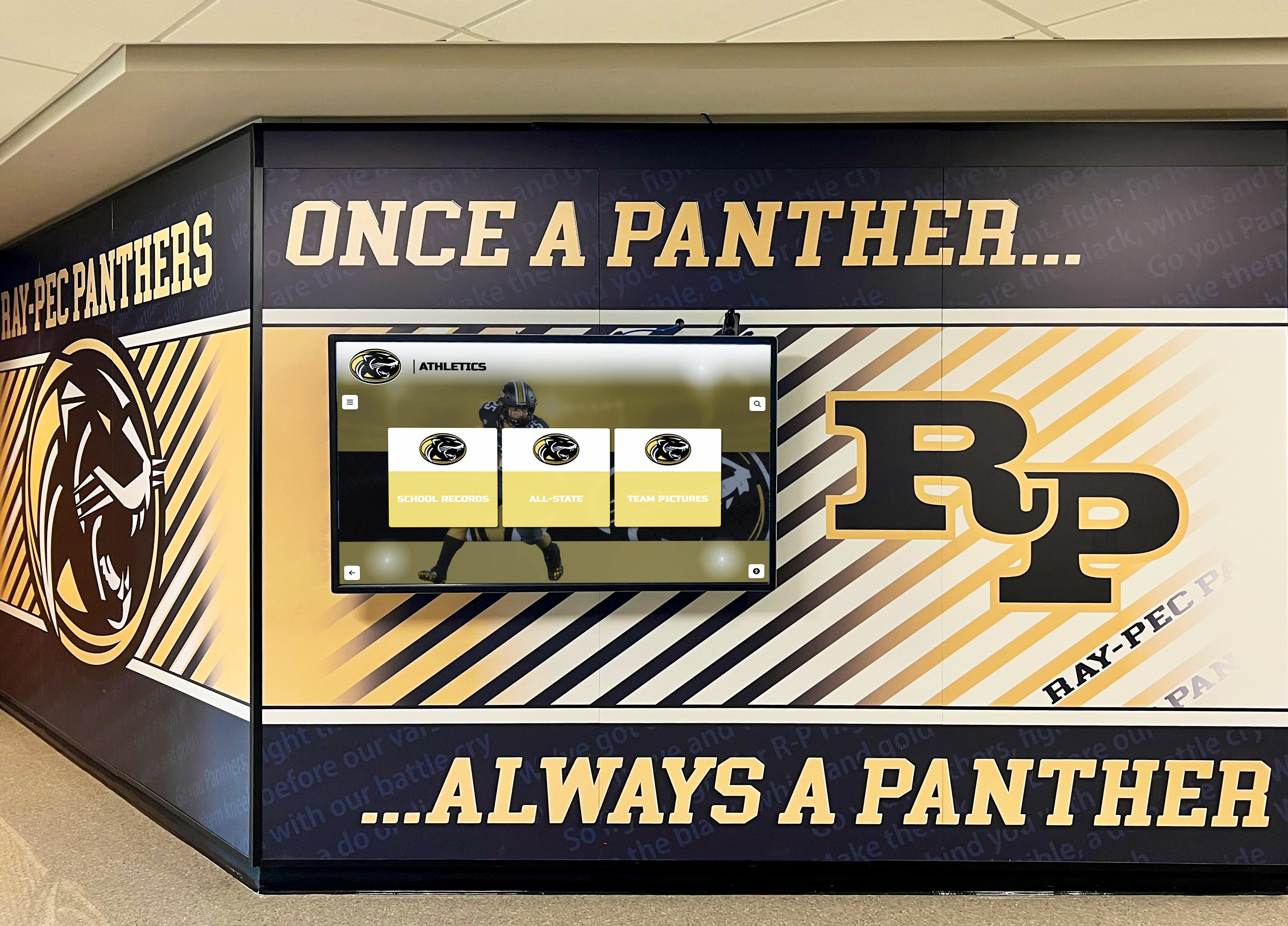
Strategic display placement in high-traffic areas ensures maximum community visibility and engagement
Part 1: Recognition and Achievement Content (Ideas 1-35)
Recognition represents the most powerful digital signage content category for building community engagement and emotional connection.
Athletic Recognition and Sports Achievement
Athletic achievement provides natural digital signage content that students, families, and communities want to explore repeatedly.
1. Hall of Fame Inductee Profiles Showcase comprehensive athlete profiles including career statistics, photos, achievements, and biographical information. Interactive displays enable searching by name, year, sport, or achievement type. Schools implementing digital athletic recognition systems report dramatic increases in community engagement as alumni discover themselves and teammates through intuitive interfaces.
2. Current Season Team Rosters Display current team rosters with player photos, positions, class years, and jersey numbers. Update content throughout seasons reflecting roster changes, highlighting captains, and featuring senior recognition.
3. Upcoming Game Schedules Show schedules for all sports with dates, times, opponents, locations, and directions to away venues. Include countdown timers to next home games and automatic updates when schedule changes occur.
4. Recent Game Results and Highlights Post recent game scores, statistics, standout performances, and photo or video highlights. Update promptly after competitions maintaining current relevant content that communities check regularly.
5. Record Boards and Statistical Leaders Feature auto-ranking record boards displaying top performances across statistical categories—career points, single-season records, single-game achievements. These leaderboards create ongoing engagement as current athletes chase historical benchmarks.
6. Championship Recognition Celebrate team championships with season documentation including rosters, statistics, photos, memorable moments, and championship game results. Preserve complete championship seasons in searchable archives.
7. Coach Recognition and Profiles Honor coaches with profiles documenting careers, achievements, coaching philosophies, and contributions to program development. Include current coaching staff with contact information and biographical backgrounds.
8. Senior Night and Special Events Document senior night ceremonies, homecoming celebrations, rivalry game traditions, and special athletic events with photo galleries and narrative descriptions preserving these important community moments.
9. Athletic Facility History Share facility history including construction dates, renovations, naming dedications, and significant events hosted. Connect communities to physical spaces where athletic memories formed.
10. Uniform Evolution and Traditions Display historical uniform evolution showing how team colors, logos, and designs changed throughout decades. Document uniform traditions and their origins connecting current teams to program heritage.
Academic Excellence and Scholarly Achievement
Academic recognition deserves equal visibility alongside athletic achievement, validating intellectual accomplishment and inspiring educational excellence.
11. Honor Roll Recognition Celebrate quarterly and annual academic honor roll recipients with names, class years, and GPA recognition tiers. Rotate featured honor students ensuring all recognized individuals receive visibility.
12. National Merit Scholar Recognition Showcase National Merit Semifinalists, Finalists, and Scholars with comprehensive profiles celebrating academic excellence. Organizations implementing National Merit recognition displays validate intellectual achievement with visibility comparable to athletic recognition.
13. Advanced Placement Scholar Recognition Celebrate AP Scholars, AP Scholars with Honor, AP Scholars with Distinction, and National AP Scholars. Include number of AP exams passed and subjects where excellence occurred.
14. Academic Competition Results Display results from academic competitions including Science Olympiad, Math League, Debate tournaments, Robotics competitions, and Model UN conferences. Recognize both team and individual achievements.
15. Valedictorian and Salutatorian Profiles Feature graduating class valedictorians and salutatorians with academic profiles, college destinations, future plans, and reflections on their educational journeys.
16. Perfect Attendance Recognition Acknowledge students achieving perfect attendance with profiles celebrating dedication and consistency. This recognition validates less visible but important student commitments.
17. Academic Milestone Achievements Celebrate reaching academic milestones—students achieving 4.0 GPAs, maintaining honor roll throughout high school careers, or earning specific numbers of college credits through dual enrollment.
18. Subject-Specific Excellence Recognize excellence in specific disciplines through subject-area awards, exceptional projects, research accomplishments, and specialized program achievements.
19. Academic Scholarship Recipients Honor students receiving academic scholarships with profiles including scholarship names, sponsoring organizations, award amounts (if appropriate), and college destinations.
20. Career and Technical Education Certifications Celebrate students earning industry certifications, completing CTE programs, or achieving technical qualifications preparing them for immediate career success.
Distinguished Alumni Recognition
Alumni recognition creates ongoing connection while inspiring current students through concrete examples of post-graduation success.
21. Distinguished Alumni Hall of Fame Feature distinguished alumni who achieved notable professional success, community impact, or brought honor to institutions. Include career accomplishments, personal backgrounds, and current activities.
22. Recent Graduate Updates Share updates from recent graduates including college acceptances, scholarship awards, career launches, military service, and post-graduation achievements maintaining connection with current students.
23. Alumni Career Profiles Showcase alumni working in diverse fields helping current students explore career possibilities through concrete examples from their own alumni communities.
24. Alumni Giving Recognition Acknowledge alumni donors supporting their alma maters with appropriate recognition that validates contributions while encouraging continued philanthropic participation.
25. Alumni Mentorship Program Participation Recognize alumni participating in mentorship programs with profiles encouraging current student participation and demonstrating ongoing alumni investment in student success.
Arts, Activities, and Co-Curricular Achievement
Beyond academics and athletics, students excel in numerous activities deserving equal recognition.
26. Theater and Performing Arts Showcases Feature theater production casts, show dates, behind-the-scenes photos, and performer profiles. Document musical performances, dance showcases, and theatrical achievements.
27. Visual Arts Gallery Displays Create digital art galleries showcasing student artwork, photography, sculptures, and creative projects. Include artist names, descriptions, and inspiration behind works.
28. Music Program Recognition Celebrate band, orchestra, and choir achievements including concert performances, competition results, all-state selections, and solo accomplishments.
29. Club and Organization Leadership Recognize student leaders serving in clubs, organizations, and student government. Feature club accomplishments, service projects, and leadership development activities.
30. Community Service and Volunteer Recognition Honor students providing community service with service hour milestones, project descriptions, and impact documentation validating philanthropic contributions.
31. Special Recognition Programs Display specialized recognition programs like Student of the Month, Character Awards, Leadership Recognition, and institutional-specific honors unique to individual schools.
32. Multi-Year Participation Recognition Acknowledge students demonstrating commitment through multi-year participation in activities, sports, or programs. Celebrate dedication and consistency across educational careers.
33. International and Exchange Student Recognition Welcome and honor international students, exchange program participants, and those studying abroad. Share cultural backgrounds and program experiences.
34. Military Commitment Recognition Honor students committed to military service through enlistment, service academy appointments, or ROTC scholarships. Display branch designations and planned service paths.
35. College Commitment and Signing Day Celebrate college athletic commitments, National Signing Day participants, and student college decisions. Feature photos, chosen institutions, intended majors, and future plans.
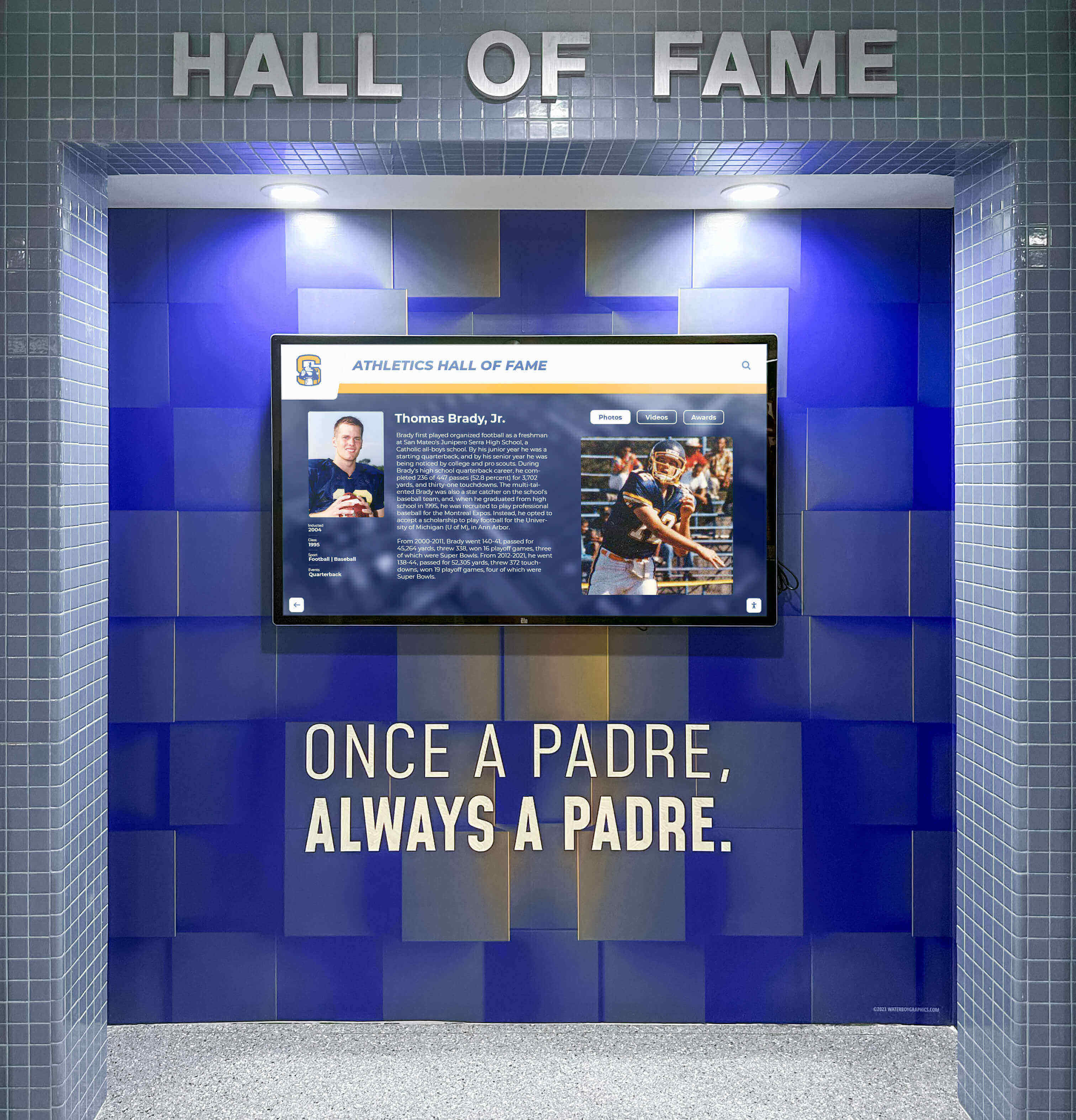
Professional recognition installations integrate seamlessly with architectural elements while celebrating achievement
Part 2: Information and Communication Content (Ideas 36-60)
Practical information creates utility that drives repeated screen interaction while serving genuine community needs.
Daily Operations and Scheduling
Timely operational information helps communities navigate daily activities and responsibilities.
36. Daily Schedule and Bell Times Display daily schedules with class periods, passing times, special schedule variations, and bell time reminders. Update automatically reflecting schedule changes or special event modifications.
37. Lunch Menu and Cafeteria Information Show daily cafeteria menus with meal descriptions, nutritional information, allergy warnings, and special diet accommodations. Include pricing and meal period times.
38. Event Calendar and Important Dates Feature upcoming events, important deadlines, testing dates, holiday schedules, and significant institutional calendar items. Provide detail enabling families to plan participation.
39. Club Meeting Schedules and Locations Display when and where clubs meet enabling student participation. Include contact information for club sponsors and brief descriptions of club purposes.
40. Athletic Practice Schedules Show practice schedules for all sports with times, locations, and any special equipment or preparation requirements helping athletes stay informed.
41. Building Maps and Wayfinding Provide interactive building maps helping visitors, substitute teachers, and new community members navigate campuses. Include office locations and key facility identifications.
42. Office Hours and Contact Information Display administrative office hours, counselor availability, nurse hours, and key staff contact information. Help communities access support services efficiently.
43. Transportation Information Show bus schedules, transportation routes, dismissal procedures, and transportation contact information helping families coordinate student pickup and drop-off.
44. Weather Alerts and Closures Feature weather forecasts, severe weather alerts, school closure announcements, and delay information. Ensure critical safety information reaches communities promptly.
45. Emergency Procedures and Safety Information Display emergency contact numbers, evacuation routes, safety protocols, and security procedures. Regularly rotate safety reminders maintaining awareness without creating alarm.
Academic Support and Resources
Resource information connects students and families to support systems enabling academic success.
46. Tutoring and Academic Support Services Advertise available tutoring, peer assistance programs, academic support centers, and study resources. Include schedules and contact information facilitating access.
47. College and Career Center Resources Promote college planning resources, career exploration tools, scholarship opportunities, and post-graduation planning support available through counseling services.
48. Library Hours and New Acquisitions Display library hours, new book arrivals, featured resources, research assistance availability, and special library programming encouraging utilization.
49. Technology Support and Resources Share technology help desk information, device troubleshooting resources, password reset procedures, and educational technology training opportunities.
50. Testing Information and Preparation Provide information about standardized testing dates, registration deadlines, testing locations, and available test preparation resources helping students prepare effectively.
Engagement and Participation Opportunities
Opportunity information encourages participation in enriching experiences students might otherwise miss.
51. Audition and Tryout Announcements Publicize upcoming auditions for plays and musicals, tryouts for sports teams, and selection processes for competitive activities. Include dates, requirements, and preparation suggestions.
52. Scholarship Opportunity Alerts Feature scholarship opportunities with application requirements, deadlines, eligibility criteria, and award amounts. Help students discover financial aid possibilities they might otherwise overlook.
53. Summer Program Information Promote summer enrichment programs, camps, internship opportunities, and educational experiences available to students during breaks.
54. Competition and Contest Announcements Advertise academic competitions, art contests, writing competitions, and other opportunities for students to showcase talents and challenge themselves.
55. Volunteer Opportunities Share community service opportunities, volunteer projects, and service learning possibilities helping students find meaningful ways to contribute to communities.
Parent and Family Communication
Family-focused content strengthens home-school connections supporting student success.
56. Parent Association News Display parent organization meeting schedules, volunteer opportunities, fundraising campaigns, and family engagement events encouraging parental involvement.
57. Family Night and Community Events Promote family-oriented events including parent nights, family dinners, community festivals, and activities welcoming entire families to participate in school life.
58. Parent Education Programs Advertise parent workshops, educational seminars, and family resource programs helping parents support student development effectively.
59. Communication Preferences and Contact Provide information about communication channels, newsletter subscriptions, social media accounts, and preferred contact methods helping families stay informed.
60. Volunteer Recognition Acknowledge parent volunteers, room parents, booster club members, and family contributors whose involvement supports program success. This recognition encourages continued participation.

Interactive kiosks in lobbies and common areas create natural exploration opportunities for students and visitors
Part 3: Institutional Heritage and Storytelling (Ideas 61-80)
Historical content preserves institutional memory while building community identity and connection to tradition.
Historical Documentation and Archives
Historical content helps communities understand organizational evolution and cultural heritage.
61. Institutional Timeline and Milestones Create interactive timelines documenting organizational history from founding through present day. Include major events, facility developments, leadership transitions, and cultural milestones.
62. Historical Photo Archives Digitize and display historical photographs showing campus evolution, student life throughout decades, and visual documentation preserving institutional memory.
63. Yearbook Archive Access Provide searchable access to digitized yearbook collections enabling community members to explore historical documentation and discover personal connections to institutional history.
64. Tradition Origins and Explanations Document how school traditions began, evolved, and continue. Help current members understand significance of rituals, celebrations, and customs defining organizational culture.
65. Facility Naming and Dedication Stories Share stories behind named facilities, buildings, fields, and spaces. Connect community members to individuals or families honored through naming dedications.
66. Historical Achievement Milestones Highlight significant historical achievements including first championships, notable academic accomplishments, groundbreaking performances, and pioneering program development.
67. Consolidated School History For schools formed through consolidations, preserve histories of predecessor institutions maintaining connection to all historical roots. Organizations implementing consolidated school history displays honor all community heritage.
68. Evolution of School Colors and Mascots Document how institutional symbols developed including color selections, mascot adoption, logo evolution, and symbolic meaning behind visual identities.
69. Notable Historical Figures Feature profiles of founding leaders, legendary educators, pioneering coaches, and significant figures who shaped institutional development.
70. Decade Retrospectives Create decade-by-decade retrospectives highlighting defining moments, cultural characteristics, and notable developments from each era in institutional history.
Celebrating Legacy and Tradition
Content connecting present to past builds belonging and institutional pride.
71. “On This Day in History” Features Display historical anniversaries showing significant events occurring on current dates throughout institutional history. These connections make history feel immediate and relevant.
72. Alumni Reunion Recognition Feature reunion classes with historical photos, notable classmates, and memories from specific graduation years. Encourage reunion attendance and alumni reconnection.
73. Legacy Family Recognition Celebrate multi-generational families with members attending across decades or centuries. These legacy stories demonstrate enduring institutional connections.
74. Historical Team and Group Reunions Document team reunions, class gatherings, and alumni returns. Show how bonds formed in schools endure throughout lifetimes.
75. Historical vs. Current Comparisons Create side-by-side comparisons showing how campuses, uniforms, traditions, or experiences evolved between past and present. These comparisons create engaging visual storytelling.
76. Preserving Oral Histories Share video interviews with long-serving faculty, distinguished alumni, or community elders preserving first-person historical accounts and cultural knowledge.
77. Historical Recognition System Archives Preserve documentation of traditional trophy cases, plaque walls, and physical recognition systems now supplemented or replaced by digital platforms. Maintain connection to all recognition forms.
78. Anniversary Celebrations Mark significant anniversaries—50th, 75th, 100th, or other milestone years—with comprehensive retrospectives celebrating institutional longevity and achievement.
79. Historical Program Development Document how academic programs, athletic teams, arts programs, and activities evolved from founding through present day showing continuous program development.
80. Alumni “Where Are They Now” Spotlights Feature update stories from alumni across graduation eras showing diverse life paths and continued institutional connection decades after graduation.
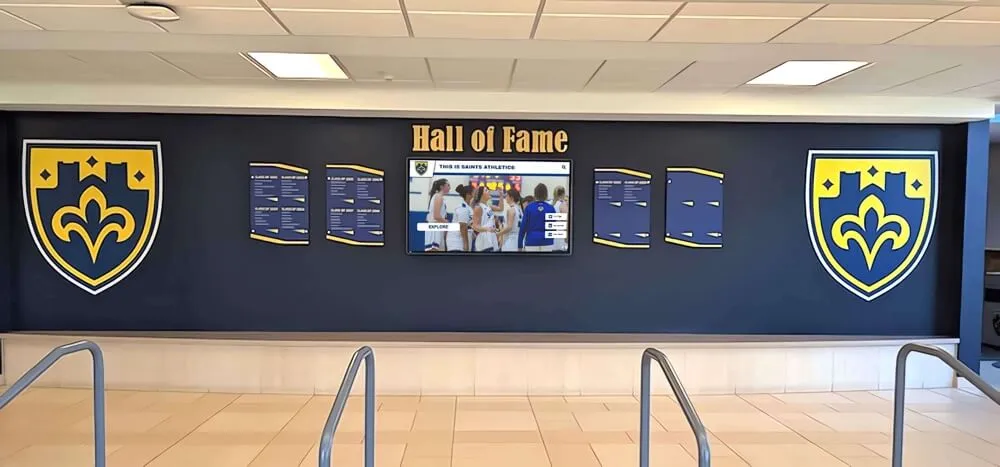
Integrated installations combine traditional recognition elements with modern digital capabilities preserving heritage while embracing innovation
Part 4: Interactive and Engagement Content (Ideas 81-100)
Interactive content transforms passive viewing into active participation creating deeper community engagement.
Touch-Enabled Interactive Experiences
Interactive touchscreen capabilities enable engagement impossible with traditional static signage.
81. Searchable Alumni and Student Directories Provide searchable databases enabling name, year, sport, or achievement searches. This discovery capability creates personalized exploration experiences where individuals find themselves and connections.
82. Interactive Building and Campus Maps Enable touch-based wayfinding where users select destinations receiving visual navigation guidance. Particularly valuable in large campuses or complex facilities.
83. Virtual Campus Tours Create self-guided virtual tours showcasing facilities, programs, and campus highlights. Prospective families explore campuses independently at their own pace.
84. Achievement Exploration and Filtering Allow filtering hall of fame content by sport, decade, achievement type, or other criteria. Users narrow large archives to specific interests creating personalized exploration.
85. Photo Gallery Browsing Enable touch-based photo gallery exploration where users swipe through images, zoom details, and navigate collections intuitively matching smartphone interaction patterns.
86. Video Content Libraries Provide libraries of game highlights, performance videos, historical footage, and institutional content accessible through intuitive touch navigation.
87. Interactive Timelines Create touchscreen timelines users navigate exploring historical periods, zooming into specific events, and discovering detailed information about institutional development.
88. QR Code Integration for Extended Content Display QR codes enabling users to continue exploration on personal devices. Transfer from public touchscreens to private mobile experiences seamlessly.
89. Social Media Aggregation Displays Showcase social media content from official accounts or community-contributed posts using institutional hashtags. Real-time social integration maintains fresh current content.
90. Interactive Quizzes and Trivia Create touchscreen trivia testing institutional knowledge, historical facts, or current awareness. Gamification elements encourage repeated interaction.
Digital-Physical Connection Points
Content bridging digital displays with physical spaces or experiences creates comprehensive engagement ecosystems.
91. Event Registration Kiosks Enable direct event registration, program sign-up, or resource reservation through touchscreen interfaces eliminating barriers to participation.
92. Feedback and Survey Collection Gather community feedback, conduct surveys, or collect input through interactive forms. Digital collection increases participation compared to paper alternatives.
93. Digital Suggestion Box Provide anonymous or attributed suggestion submission enabling community input on improvements, concerns, or ideas supporting participatory governance.
94. Meeting Room Reservation Displays Show real-time meeting room availability with instant reservation capabilities. Particularly valuable in facilities with numerous bookable spaces.
95. Information Request Submission Enable visitors to request information, schedule appointments, or initiate contact with departments without needing to find specific offices.
96. Digital Guestbook and Visitor Sign-In Replace traditional visitor sign-in with digital alternatives capturing contact information while providing wayfinding or informational content.
97. Interactive Donor Recognition Walls Create comprehensive donor recognition displays where contributors explore recognition while learning about continued giving opportunities.
98. Facility Booking and Scheduling Display facility availability with direct booking capabilities streamlining space reservation for community organizations and programs.
99. Document and Resource Access Provide digital access to forms, handbooks, guides, and resources eliminating trips to administrative offices for routine documentation.
100. Real-Time Athletic Statistics Display live or recently updated athletic statistics including current season standings, individual performance metrics, and comparative analytics creating engaging data visualization.
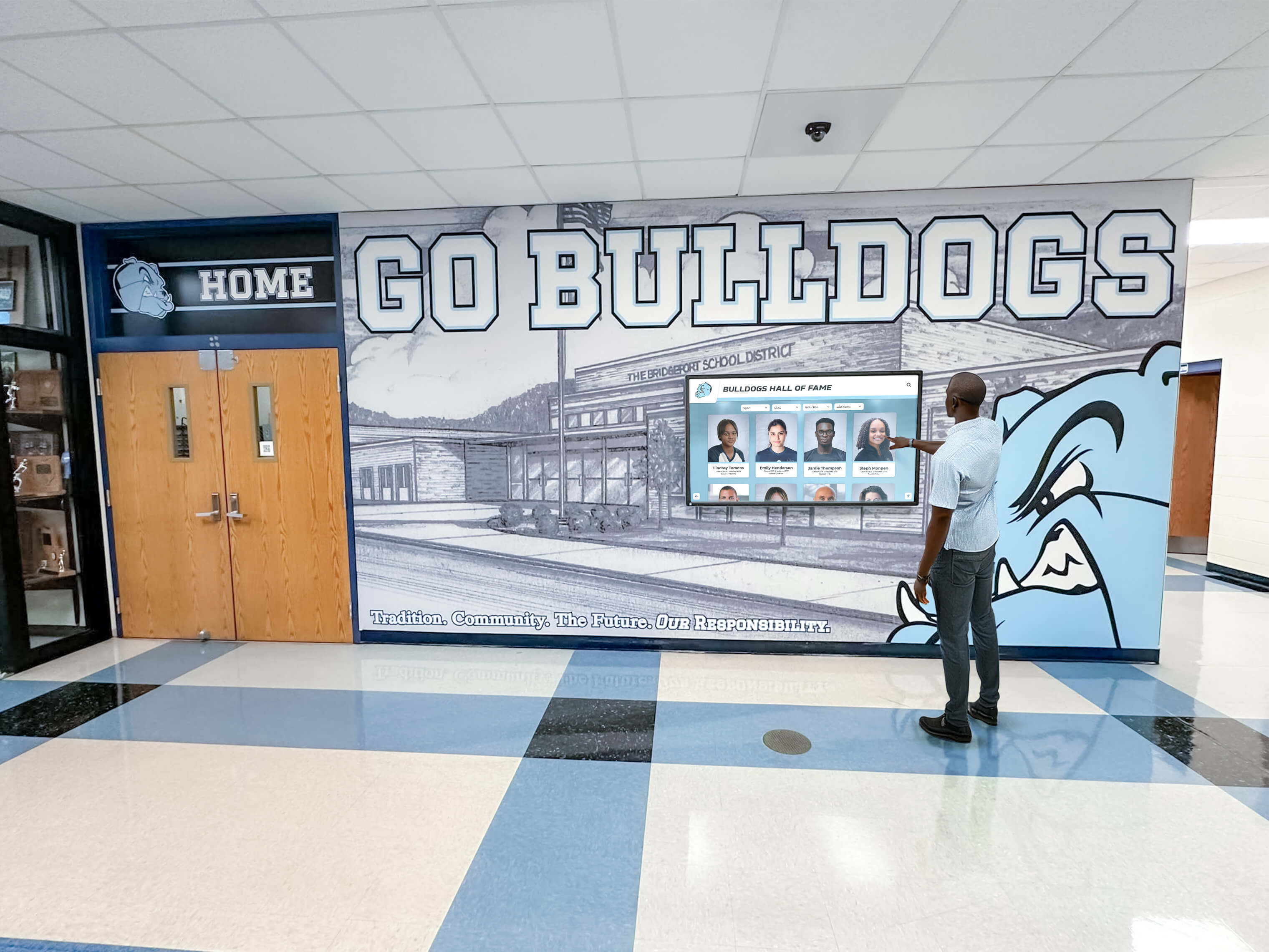
Hallway installations enable spontaneous exploration as community members discover achievements while navigating facilities
Part 5: Specialized and Unique Content Applications (Ideas 101-120)
Beyond common digital signage applications, specialized content serves unique organizational needs and contexts.
Seasonal and Time-Specific Content
Content tied to seasons, holidays, or specific times creates timely relevance.
101. Holiday and Seasonal Recognition Celebrate holidays, seasons, and cultural observances with appropriate content respecting diverse community traditions while building festive environments.
102. Testing Schedule Countdowns Display countdowns to important testing dates with preparation reminders, study resources, and encouraging messages supporting student success.
103. Graduation Countdown and Senior Recognition Count down to graduation while featuring senior class profiles, memories, and celebration of completing educational journeys.
104. Seasonal Sports Transition Announcements Mark transitions between athletic seasons with upcoming tryout information, off-season training programs, and fall-winter-spring sport promotions.
105. Academic Year Milestones Celebrate academic year milestones including first day of school, semester transitions, exam periods, breaks, and year-end celebrations.
Community Building and Culture Content
Content reinforcing values, culture, and community identity strengthens organizational cohesion.
106. Mission, Vision, and Values Display Regularly display institutional mission statements, core values, and vision statements reinforcing cultural foundations and organizational purpose.
107. Character Education Themes Feature monthly character themes with definitions, examples, and recognition of students exemplifying highlighted traits. Support intentional character development programming.
108. Student Spotlight Features Rotate daily or weekly student spotlights celebrating individuals not necessarily achieving major awards but contributing positively to communities. This inclusive recognition validates all members.
109. Staff and Faculty Recognition Honor educators through Teacher Appreciation features, service milestone recognition, and profiles celebrating faculty contributions. Communities implementing teacher recognition programs demonstrate appreciation for educational professionals.
110. School Spirit and Pride Content Display school colors, mascot imagery, spirit week themes, pep rally information, and content building institutional pride and community enthusiasm.
111. Cultural Heritage and Diversity Celebration Honor diverse cultural backgrounds, celebrate heritage months, and recognize international perspectives enriching community environments.
112. Environmental and Sustainability Initiatives Showcase sustainability efforts, environmental achievements, recycling programs, and community commitments to environmental stewardship.
113. Community Partnership Recognition Acknowledge business partners, community sponsors, civic organizations, and external relationships supporting institutional missions.
114. Inspirational Quotes and Messages Share carefully selected inspirational quotes, motivational messages, and thought-provoking content supporting positive environments without becoming cliché.
115. “Day in the Life” Photo Galleries Create photo essay galleries documenting typical days showing authentic experiences, activities, and interactions defining institutional life. Organizations implementing day in the life displays humanize institutions through authentic storytelling.
Specialized Program Applications
Unique organizational contexts enable specialized content applications.
116. Museum and Historical Society Exhibits Organizations operating museums or historical collections create digital interactive museum displays enabling self-guided exploration of artifacts, archives, and collections.
117. Performing Arts Season Promotion Theater programs showcase upcoming productions, behind-the-scenes content, cast interviews, ticket information, and performance dates promoting attendance.
118. Athletic Facility Donor Recognition Facilities built through capital campaigns display donor recognition acknowledging contributions enabling construction while encouraging continued philanthropic support.
119. Renovation and Construction Progress During facility improvements, document construction progress with timeline comparisons, completion percentages, and vision previews maintaining community excitement.
120. Alumni Career Network Connections Facilitate mentorship and networking by featuring alumni open to connecting with current students. Display career fields, contact preferences, and mentorship availability supporting professional development.
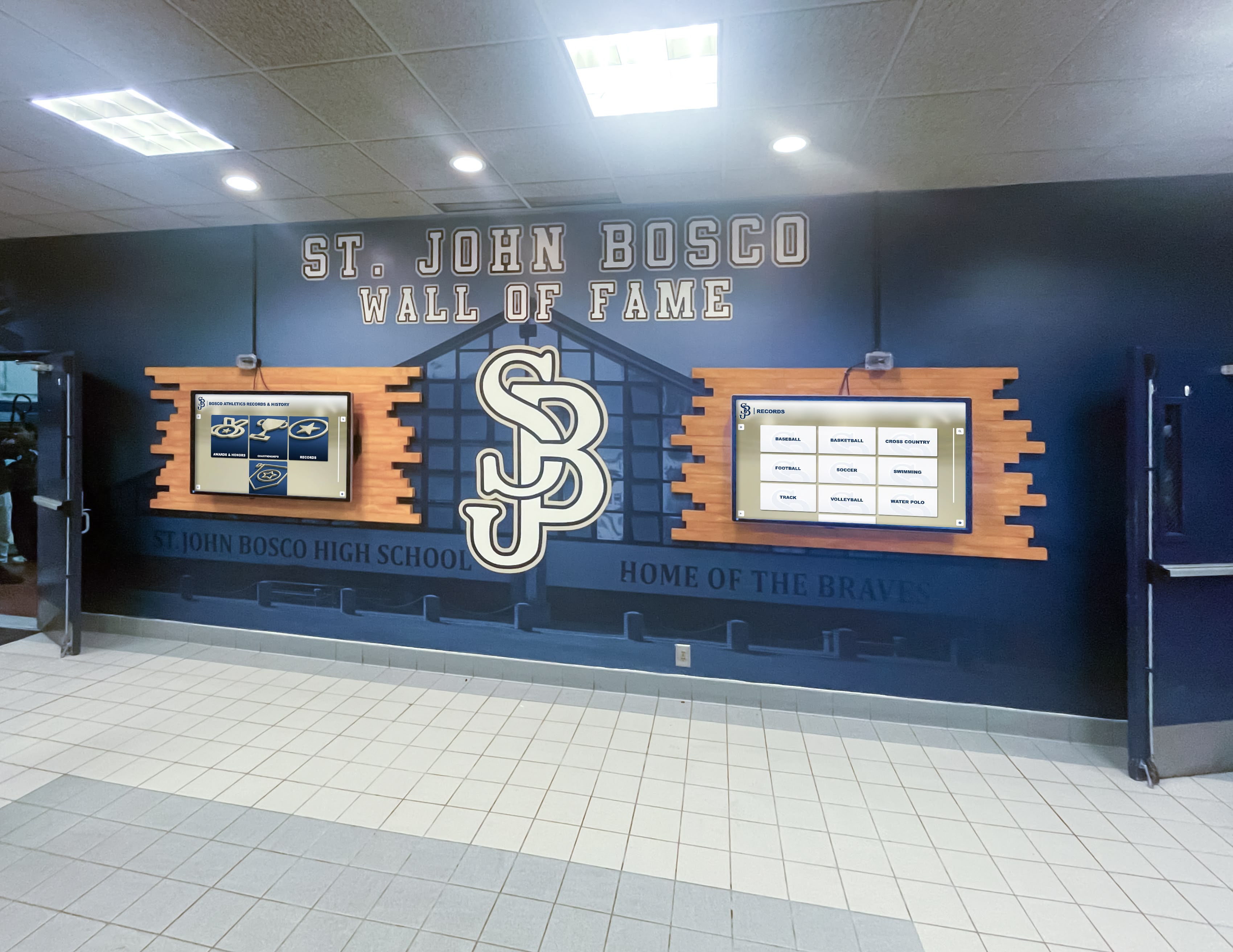
Multiple coordinated displays provide comprehensive recognition capacity celebrating diverse achievements across programs
Creating Sustainable Digital Signage Content Strategies
Generating 120 different content ideas means nothing without sustainable strategies ensuring displays remain fresh, relevant, and engaging over time.
Content Planning and Rotation
Successful digital signage requires systematic content planning preventing displays from becoming stale.
Establish Content Calendars Develop annual content calendars mapping when different content categories display throughout years. Plan recognition timing around ceremonies and announcements, align information content with academic calendars and event schedules, and schedule historical content around anniversaries and milestone dates.
This advance planning prevents last-minute content scrambles while ensuring displays remain current and relevant to community needs throughout entire years.
Implement Content Rotation Strategies Even excellent content becomes invisible when displayed continuously without variation. Rotate featured content ensuring all recognition receives visibility, cycle through historical archives preventing repetition, and vary informational displays matching different times of day or week.
Automated content management systems enable this rotation without requiring daily manual updates, maintaining freshness while reducing administrative burden.
Balance Permanence and Timeliness Effective digital signage balances evergreen content remaining relevant indefinitely with time-sensitive content requiring prompt updates. Core recognition content like hall of fame archives persists across years, while event information, schedules, and announcements require frequent updates maintaining accuracy.
Understanding this balance enables realistic content management expectations and appropriate staffing.
Leveraging Technology for Sustainable Content
Modern digital signage platforms enable content management efficiency impossible with older systems.
Cloud-Based Remote Management Platforms like Rocket Alumni Solutions provide cloud-based content management enabling authorized staff to update displays from any internet-connected device without touching physical hardware. This remote capability proves essential for sustainable long-term operation.
Staff can update event information from offices, add recognition content from home, and make urgent changes during emergencies without requiring physical campus presence. Remote management transforms content updates from disruptive interruptions into quick efficient tasks.
Automated Content Integration Advanced platforms integrate with existing systems automatically pulling content from calendars, student information systems, athletic scheduling software, and other institutional databases. This integration eliminates duplicate data entry while ensuring displayed information matches source systems.
When calendar events automatically appear on digital signage, when honor roll lists populate from student information systems, and when athletic schedules sync from scheduling platforms—content management burden decreases dramatically while accuracy improves.
Role-Based Access Control Multiple staff members across departments may need content management capabilities. Athletic directors manage sports recognition, admissions staff update prospective family information, and counselors maintain academic resource content.
Granular permission systems enable appropriate access without requiring universal administrator privileges. This distributed management prevents bottlenecks where single administrators become overwhelmed with content requests.
Measuring Content Effectiveness
Understanding which content creates engagement enables continuous improvement based on actual community behavior rather than assumptions.
Interaction Analytics Interactive touchscreen systems track engagement metrics including total interactions, session duration, most-searched content, frequently viewed profiles, and navigation patterns. This data reveals what content resonates with communities.
When analytics show certain sports or programs receive disproportionate attention, content strategies can address imbalances ensuring comprehensive representation. When specific features see limited use, interfaces can improve accessibility or content can better match community interests.
Gathering Qualitative Feedback Quantitative analytics complement qualitative feedback. Survey community members about content preferences, observe how visitors interact with displays noting engagement patterns, and maintain suggestion systems enabling community input on desired content.
This combined quantitative-qualitative approach creates comprehensive understanding of content effectiveness informing strategic decisions.
Iterating Based on Results Digital signage content should evolve based on measurement and feedback. Successful content categories expand, underperforming content redesigns or eliminates, and new approaches test in response to community needs.
This continuous improvement mindset prevents displays from becoming static over time while ensuring content remains relevant to evolving community expectations.
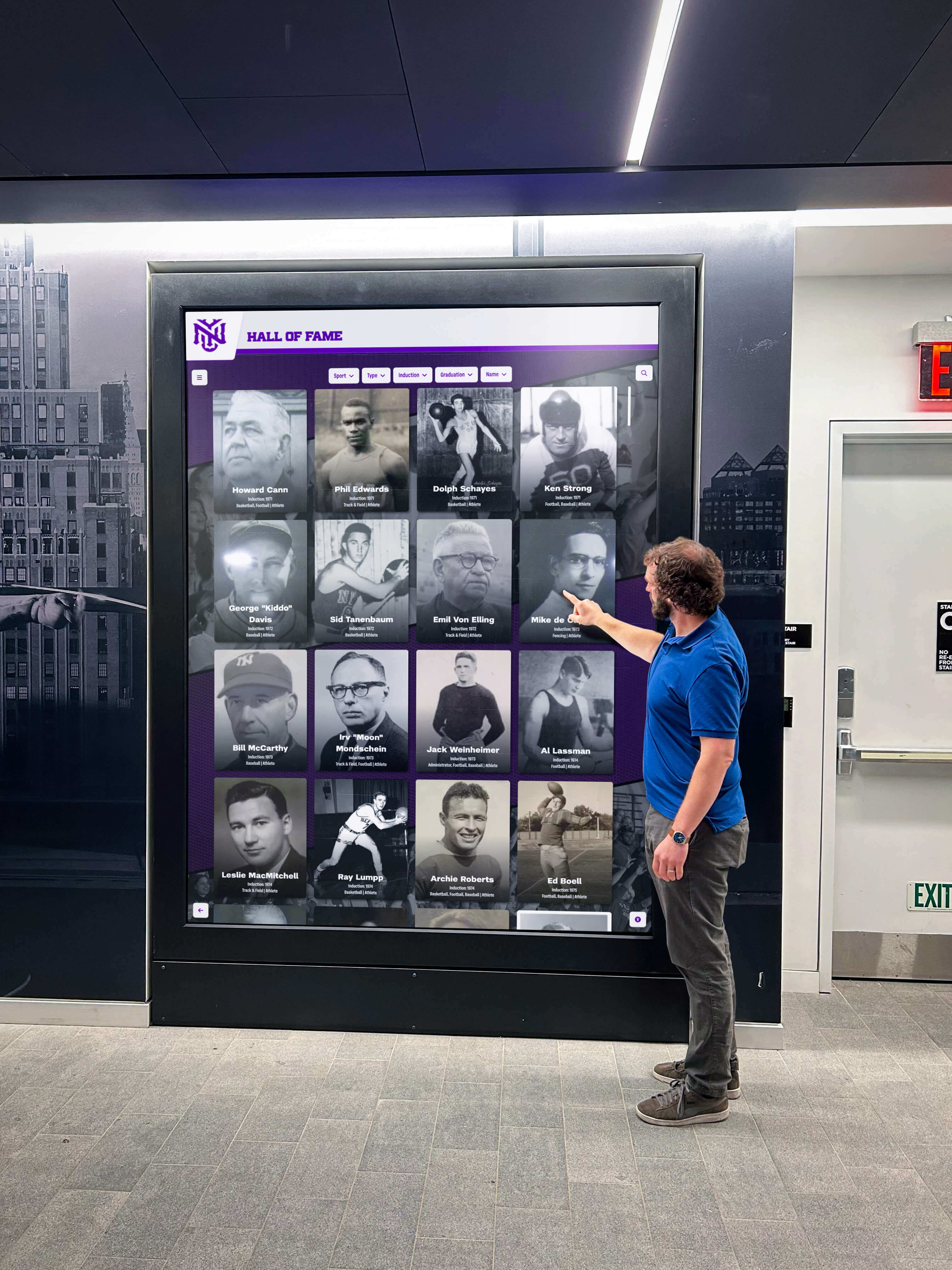
Engaging recognition software creates active exploration and personal discovery rather than passive content viewing
Conclusion: Transforming Digital Signage Into Community Engagement Tools
Digital signage screens and interactive kiosks represent more than technology investments—they embody opportunities to transform how communities celebrate achievements, preserve heritage, share information, and maintain connections. Yet these opportunities materialize only when thoughtful content strategies prioritize genuine community value over administrative convenience or technology showcasing.
The 120 digital signage content ideas explored throughout this comprehensive guide provide concrete starting points for schools, athletic departments, alumni organizations, and community spaces seeking to create what we call “digital warming”—transforming cold, underutilized displays into active engagement hubs that communities want to explore regularly.
Effective digital signage balances recognition that validates individual contributions, information that serves practical needs, storytelling that preserves institutional memory, and engagement that invites active participation. When alumni discover themselves and classmates through searchable directories, when students find academic achievements receiving visibility comparable to athletic recognition, when families explore institutional history connecting personal experiences to broader traditions, and when communities encounter current relevant information addressing immediate needs—displays create genuine value extending far beyond simple content broadcasting.
The technical capabilities exist today to implement any of these 120 content ideas. Modern platforms like Rocket Alumni Solutions provide comprehensive content management, interactive touchscreen capabilities, unlimited storage capacity, and accessibility features ensuring inclusive experiences. Technology no longer constrains possibilities—content strategy determines whether digital signage investments create engagement or become expensive digital wallpaper.
Success requires moving beyond viewing digital signage as simply screens displaying messages. Instead, effective implementations recognize displays as engagement platforms creating personalized experiences, surfacing relevant content matching individual interests, preserving institutional memory in accessible formats, and building community connections through continuous meaningful interaction.
Organizations implementing comprehensive digital signage content strategies report dramatic engagement improvements as members spend significantly more time exploring displays, return repeatedly discovering updates, and share recognition with extended networks amplifying impact far beyond physical screen locations. These transformations occur not through expensive technology upgrades but through strategic content decisions prioritizing community value.
Your digital signage screens and interactive kiosks can become active participants in community building rather than passive information displays. The 120 content ideas presented provide starting frameworks, but your unique institutional context, community characteristics, and organizational priorities should guide specific content selection and implementation approaches.
Start by auditing current digital signage content identifying gaps and opportunities. Which recognition categories receive insufficient visibility? What practical information could better serve community needs? How might historical content strengthen institutional connection? What interactive capabilities remain underutilized? These questions reveal specific improvement opportunities within your context.
Develop sustainable content management workflows preventing displays from becoming stale over time. Assign clear responsibilities for different content categories, establish realistic update frequencies matching available resources, and use technology automating routine updates while enabling efficient manual management when needed.
Measure engagement systematically using both quantitative analytics and qualitative feedback. Understand which content creates interaction, which leaves communities indifferent, and which opportunities remain unexplored. Iterate continuously based on evidence rather than assumptions improving effectiveness over time.
Most importantly, remember that effective digital signage serves communities rather than organizations. Content succeeds when it provides recognition individuals want to discover and share, information people need to participate fully in community life, stories connecting members to institutional identity, and interactions creating genuine engagement rather than forced participation.
Digital warming transforms institutional spaces from cold environments members pass through into thriving communities members want to explore and engage with regularly. Through thoughtful content strategy implementing ideas like those presented throughout this guide, your digital signage investments can create these warming effects strengthening the bonds, pride, and participation defining thriving communities.
Ready to transform your digital signage from underutilized screens into effective community engagement tools? Book a demo to discover how purpose-built interactive touchscreen platforms create digital warming effects through recognition, storytelling, and engagement impossible with generic digital signage solutions.































